





Latest Version
Latest
August 17, 2026
Communication
Android
307
Free
com.instagram.barcelona
Report a Problem
More About Threads – Instagram’s Text‑Based Conversation App
What is Threads?
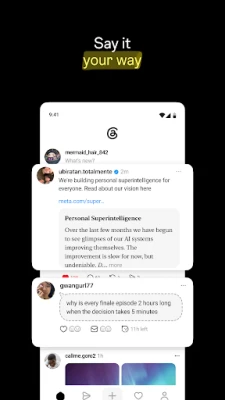
Threads is a companion app from Instagram that shifts the conversation from photos and videos to text. It provides a dedicated space where you can start short posts, called threads, and engage in real‑time discussions with friends, followers, and public creators.
Main Features
- Instant access to Instagram contacts – Your Instagram username, verification badge and follow list are automatically available, so you can connect with the same people you already know.
- Create and reply to threads – Post a short message, add optional media, and control who can reply or mention you.
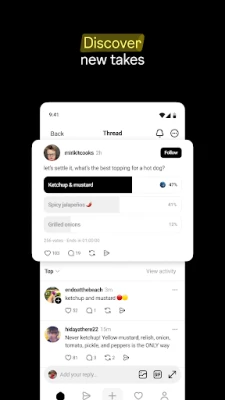
- Follow creators and topics – Discover public accounts, join conversations around interests, and receive updates when they post new threads.
- Customizable privacy settings – Choose who can see your posts, reply, or mention you. Blocked accounts from Instagram carry over.
- Notifications for active discussions – Stay informed about replies, mentions, and trending topics that match your interests.
How It Works
After installing Threads, you sign in with your Instagram credentials. The app syncs your existing follow list, making it easy to start chatting with people you already follow. To start a conversation, tap the compose button, type your message, and optionally attach a photo or link. You can set the audience for each post – public, friends only, or a custom list.
When you view a thread, you can like, reply, or share it. Replies appear in a nested view, keeping the conversation organized. You can also explore curated collections of threads based on popular hashtags or categories, helping you discover new perspectives.
Practical Uses
- Quick updates – Share short thoughts, announcements, or event reminders without creating a full Instagram post.
- Community building – Join niche groups centered on hobbies, professional fields, or fandoms and contribute to ongoing discussions.
- Feedback and Q&A – Ask questions directly to creators or brands and receive answers in a public thread that others can benefit from.
- Event coverage – Follow live events, such as sports games or product launches, and see real‑time commentary from participants.
Installation Information
Threads is available as a free download from the Google Play Store. Search for “Threads” by Instagram, tap “Install,” and follow the on‑screen prompts to log in with your Instagram account. The app requires a standard Android device with Google Play services; specific version requirements are not listed, so it should work on most recent Android releases.
Things to Know Before Installing
- Threads uses the same account information as Instagram, so any privacy settings you have on Instagram will affect your experience in Threads.
- The app focuses on text‑based interaction, but you can still attach images or links if you wish.
- Because it is tied to Instagram, you will need an active Instagram account to use Threads.
Who May Find It Useful?
Anyone who enjoys concise, text‑driven conversation will benefit from Threads. It is especially handy for:
- Social media enthusiasts who want a separate space for discussions.
- Creators looking to engage followers through quick updates.
- Professionals seeking industry‑specific chats without the visual clutter of a full‑feed app.
Frequently Asked Questions
Do I need a separate account for Threads?
No. Threads uses your existing Instagram login.
Can I control who sees my threads?
Yes. You can set each post to be public, friends‑only, or limit it to a custom audience.
Are Instagram blocks applied in Threads?
Blocked accounts from Instagram are automatically blocked in Threads as well.
Is the app free?
Threads is free to download and use.
Rate the App
User Reviews















Popular Apps










 Games
Games Entertainment
 Communication
 E-mail
 Security
 Tools
Tools Media
Media Internet
 Finance
 Design
 Education
 Android Firmwares
 Travel & Local
 Android
 Windows
 Linux
Linux