
Latest Version
September 06, 2026
Small Change Big Difference
Media
Android
9
Free
dev.vishnuv.tvgram
Report a Problem
More About Telegram Video Player: TvGram – Stream Telegram Videos Instantly
What is TvGram?
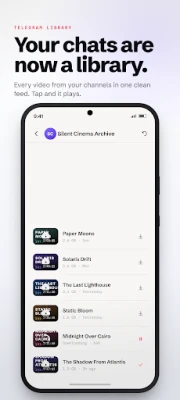
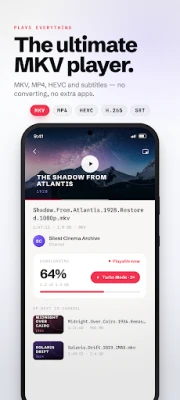
TvGram is a dedicated video player that integrates with your Telegram account. It lets you open video files shared in Telegram conversations and start watching them immediately, whether you are on a smartphone, tablet or an Android TV device.
Main features
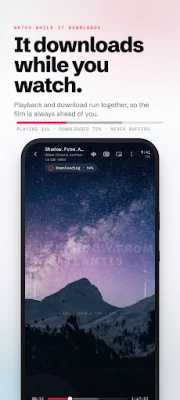
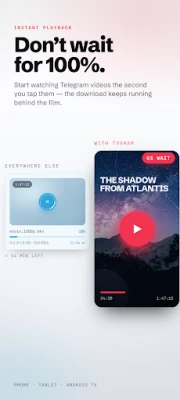
- Instant streaming – Tap a video and playback begins from the first bytes, so you don’t need to wait for the whole file to download.
- Broad format support – Handles common containers such as MP4, MKV, AVI, MOV and others, as well as modern codecs like H.264, HEVC and VP9.
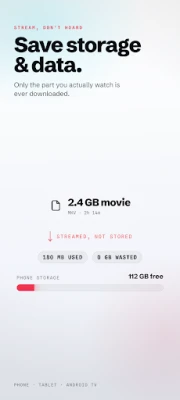
- Large‑file friendly – Works with videos that are several gigabytes in size without filling your device storage.
- Smart buffering – Adjusts to slower connections, keeping playback smooth on 3G or congested Wi‑Fi.
- Offline saving – You can download any streamed video for later viewing without an internet connection.
- Android TV ready – The same interface scales to big‑screen devices, letting you enjoy Telegram videos on your TV.
How it works
After installing TvGram, you log in with the same credentials you use for Telegram. The app reads the list of chats, groups and channels you have access to and presents any video messages as playable items. When you select a video, TvGram begins fetching the initial data packets and feeds them to the built‑in decoder, so playback starts within seconds. If you choose to download, the app stores the file in your device’s media folder for offline access.
Practical uses
- Watch short clips shared by friends without cluttering your gallery.
- Stream long movies or lectures posted in Telegram channels while conserving storage space.
- Use an Android TV set‑up to view educational or entertainment content from Telegram on a larger screen.
Installation information
The app is distributed as a free download. Install it from a trusted Android marketplace, grant the required permissions for accessing your Telegram account and media storage, and you’re ready to start streaming.
Compatibility
TvGram runs on Android devices that support the standard Telegram client. It works on phones, tablets and Android TV platforms that meet the minimum system requirements for the Telegram API.
Things to know before installing
- You need an active Telegram account; the app does not create a new account.
- Streaming consumes data; consider using Wi‑Fi for large files.
- The app does not modify or replace the official Telegram app; it works alongside it.
Who may find TvGram useful?
Anyone who receives video content through Telegram and prefers to watch it without waiting for full downloads. This includes casual users sharing clips, students accessing lecture recordings, and households that use Android TV for media consumption.
Frequently asked questions
Does TvGram store videos automatically?
No. Videos are streamed by default. You can choose to download a specific video for offline playback.
Can I use TvGram on a non‑TV Android device?
Yes. The interface adapts to phones and tablets as well as Android TV.
What video formats are supported?
Common containers such as MP4, MKV, AVI, MOV, WEBM and others are supported, along with modern video and audio codecs.
Is my Telegram account safe?
TvGram uses the same login process as the official Telegram client, and it does not store your credentials beyond what Telegram requires for authentication.
Rate the App
User Reviews









Popular Apps










 Games
Games Entertainment
 Communication
 E-mail
 Security
 Tools
Tools Media
Media Internet
 Finance
 Design
 Education
 IT Tools
 Travel & Local
 Android
 Windows
 Linux
Linux