


Latest Version
Latest
September 08, 2026
T-Mobile USA
Communication
Android
31
Free
com.tmobile.vvm.application
Report a Problem
More About T-Mobile Visual Voicemail – Manage Your Messages on Android
What is T‑Mobile Visual Voicemail?
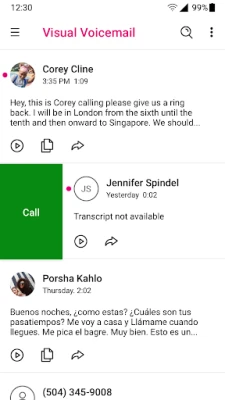
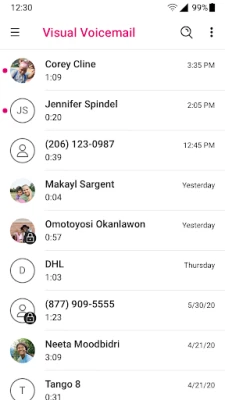
T‑Mobile Visual Voicemail is an Android application provided by T‑Mobile USA that replaces the traditional voicemail system with a visual interface. Instead of calling a number and listening to messages sequentially, the app lists each voicemail as a separate item, letting you play, delete, or share messages at your convenience.
Main features
- Visual inbox – All received voicemails appear as a list with timestamps, caller ID and optional transcription.
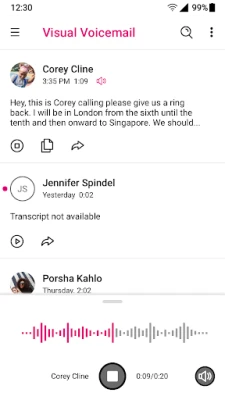
- Selective playback – Play any message in any order without having to listen to previous messages.
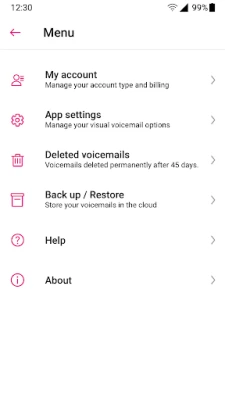
- Greeting management – Record and update your personal voicemail greeting from within the app.
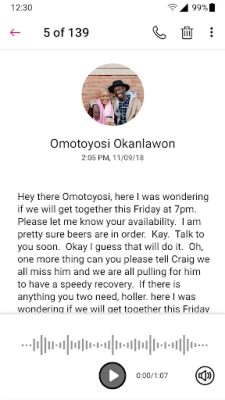
- Voicemail‑to‑text (optional) – A premium add‑on can transcribe messages into text, making it easier to skim content.
- Export options – Save, share or delete individual voicemails with a few taps.
How it works
When you launch the app for the first time, it authenticates your T‑Mobile account over the carrier’s network. After authentication, the app syncs with your voicemail box and populates the visual inbox. Each new voicemail is downloaded automatically, and you can tap a message to stream it or download it for offline listening.
Practical uses
- Quickly identify important messages by caller name or number before listening.
- Read transcriptions (if you have the premium feature) while driving or in noisy environments.
- Save a voicemail as an audio file and forward it via email or messaging apps.
- Delete old messages directly from the app to keep your mailbox tidy.
Installation information
The app is available for free on the Google Play Store. Simply search for "T‑Mobile Visual Voicemail" and tap Install. No additional fees are required for the core visual voicemail functionality.
Compatibility
The app is designed for Android devices that can run Google Play services and have a T‑Mobile cellular connection for the initial account verification. After the first authentication, the app can be used on Wi‑Fi as well.
Things to know before installing
- The visual voicemail service works only with T‑Mobile phone numbers; other carriers are not supported.
- Initial authentication requires a data connection on the T‑Mobile network; this step is performed once.
- Transcription and translation features are offered as a paid upgrade and are not part of the free version.
Who may find it useful?
Anyone who receives frequent voicemails and prefers a modern, list‑based interface will benefit. The app is especially handy for users who need to manage messages while on the go, such as professionals, students, or anyone who finds traditional voicemail cumbersome.
Frequently asked questions
Do I need to change my existing voicemail number?
No. The app works with your current T‑Mobile voicemail number and does not require any changes to your carrier settings.
Is the app safe to use?
The app is published by T‑Mobile USA, the carrier that provides the underlying voicemail service. It follows standard Android security practices and uses foreground services only when actively recording or playing a message.
Can I use the app on a tablet?
Yes, as long as the device runs Android and can access the Google Play Store, the app will function, though a cellular connection is needed for the initial authentication.
What happens to my voicemails if I uninstall the app?
Uninstalling the app does not delete the voicemails stored on T‑Mobile’s servers. They remain accessible through the carrier’s traditional voicemail system.
Rate the App
User Reviews















Popular Apps










 Games
Games Entertainment
 Communication
 E-mail
 Security
 Tools
Tools Media
Media Internet
 Finance
 Design
 Education
 Android Firmwares
 Travel & Local
 Android
 Windows
 Linux
Linux