



Latest Version
Latest
August 14, 2026
Valve Corporation
Communication
Android
341
Free
com.valvesoftware.android.steam.friendsui
Report a Problem
More About Steam Chat – Stay Connected with Your Steam Friends
What is Steam Chat?
Steam Chat is Valve Corporation’s mobile companion for the Steam gaming platform. It lets you keep in touch with your Steam friends, join group conversations, and receive real‑time notifications about game invites and messages—all from your Android device.
Main Features
- Friend list at a glance – See which friends are online, in‑game, or offline without opening the desktop client.
- Rich media support – Share links, videos, GIFs, and Steam emoticons directly in chat.
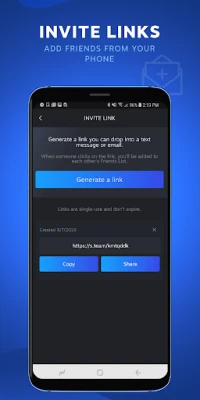
- Invite links – Generate a link to add new friends on Steam and share it via text or email.
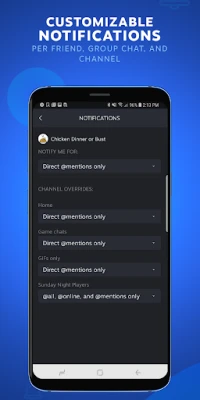
- Customizable notifications – Adjust notification settings per friend, group, or channel so you never miss an important message.
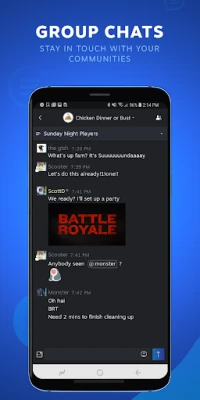
- Group chats – Create or join community groups to coordinate game nights, discuss strategies, or just hang out.
How It Works
After installing the app, you sign in with your existing Steam credentials. The app synchronizes with your Steam account, pulling in your friend list, group memberships, and chat history. Conversations are updated in real time, and push notifications alert you to new messages or game invitations.
Practical Uses
- Coordinate multiplayer sessions with friends while away from your PC.
- Stay informed about friends’ gaming activity and join them quickly.
- Participate in community discussions without needing a desktop.
- Share screenshots, videos, or funny GIFs directly from your phone.
Installation Information
The app is available for free on the Google Play Store. Search for "Steam Chat" or use the package name com.valvesoftware.android.steam.friendsui to locate it. Installation follows the standard Android process: tap Install, grant the requested permissions, and launch the app.
Things to Know Before Installing
- The app requires a Steam account; it does not create a new account.
- Internet connectivity is needed for real‑time chat and notifications.
- Permissions are limited to those necessary for network access and notifications.
Who May Find It Useful?
Anyone who already uses Steam on PC or console will benefit from Steam Chat. It is especially handy for gamers who travel, have limited PC access, or prefer mobile communication for quick coordination.
Frequently Asked Questions
Do I need a separate Steam account for the mobile app?
No. Use the same credentials you already have for the desktop client.
Can I receive game invites on my phone?
Yes. When a friend invites you to a game, the app shows a notification that you can accept or decline.
Is the chat history stored on the device?
Chat history is synced with your Steam account and is accessible across devices. Local storage is limited to recent messages for quick access.
What languages are supported?
The interface follows the language settings of your Android device and supports the major languages offered by Steam.
Rate the App
User Reviews















Popular Apps










 Games
Games Entertainment
 Communication
 E-mail
 Security
 Tools
Tools Media
Media Internet
 Finance
 Design
 Education
 Android Firmwares
 Travel & Local
 Android
 Windows
 Linux
Linux