

Latest Version
August 29, 2026
Abk Tech
Communication
Android
103
$1.49
com.bencoorp.sms.android.apps.messaging
Report a Problem
More About SMS Messenger Pro: Secure SMS – Premium Messaging
What is SMS Messenger Pro?
SMS Messenger Pro: Secure SMS is a paid Android messaging client developed by Abk Tech. It replaces the default messaging app with a cleaner, more customizable interface while adding tools that help you keep private conversations separate and your inbox organized.
Main features
- Private vault – Move selected chats into a hidden area that is encrypted locally. Access to the vault is protected by biometric authentication or a PIN you set.
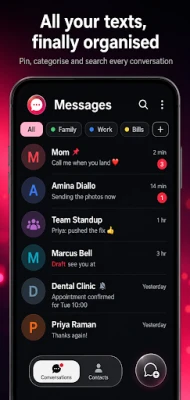
- Smart inbox categorization – The app automatically groups incoming messages into tabs such as Personal, Transactions, OTPs and Promotions, making it easier to locate the information you need.
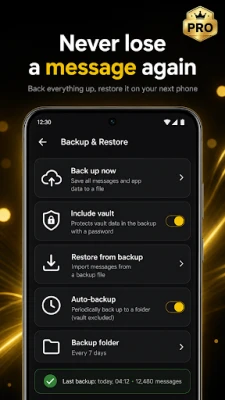
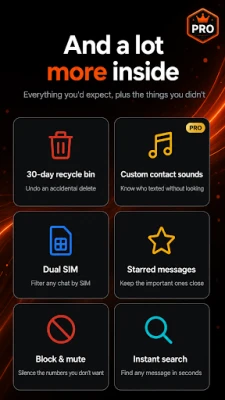
- Recycle bin – Deleted messages are retained for a period, allowing you to restore them if you change your mind.
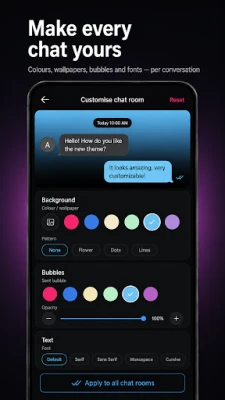
- Material You design – The UI follows the latest Android design guidelines, adapts to your wallpaper colors, and includes a dark mode optimized for OLED screens.
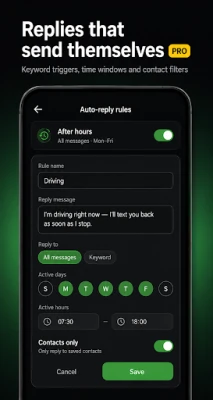
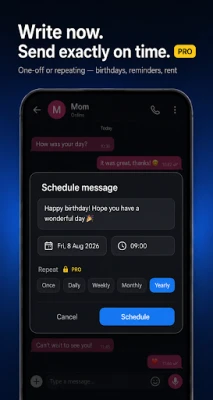
- Scheduled sending – Compose a message now and set a future delivery time.
- Rich media support – Send photos, videos and audio files directly from the conversation view.
- Voice‑to‑text – Convert spoken words into text messages using the built‑in speech recognizer.
- Spam filter – Identify and block common telemarketing or fraudulent SMS patterns.
- Link previews – When a URL appears in a message, the app shows a short preview so you can see where it leads before opening it.
How it works
After installation, SMS Messenger Pro becomes the default SMS handler if you choose. The app reads incoming messages through the standard Android SMS provider, then applies its categorization engine to place each message in the appropriate tab. When you move a conversation to the vault, the app encrypts the content locally and hides it from the main list. Access to the vault requires either a fingerprint/face scan or a PIN you define during setup.
Practical uses
- Keep verification codes (OTPs) readily visible without scrolling through unrelated chats.
- Separate banking alerts and digital receipts from personal conversations.
- Store sensitive discussions—such as legal or financial matters—in the vault for added privacy.
- Schedule reminders or birthday wishes to be sent at a specific time.
Installation information
The app is available for purchase at $1.49. After purchase, download and install the APK from a trusted source. Once installed, you can grant the required permissions for SMS access, contacts (optional for name lookup), and biometric authentication if you wish to use the vault.
Things to know before installing
- The app requires standard SMS permissions to read and send messages; no additional network access is needed for core functionality.
- All vault encryption is performed locally; the app does not store your messages on external servers.
- Because the app replaces the default messaging UI, you may need to adjust notification settings to match your preferences.
Who may find it useful?
Anyone who relies heavily on SMS for personal or transactional communication and wants a clearer view of their inbox will benefit. Users who value on‑device privacy—such as those handling sensitive work‑related texts—will appreciate the vault feature.
Frequently asked questions
Is the vault completely private?
Yes, the vault encrypts messages on the device and can only be opened with biometric authentication or a PIN you set.
Can I restore a deleted message?
Deleted messages are kept in the recycle bin for a limited time, allowing you to restore them before permanent removal.
Does the app work with dual‑SIM phones?
SMS Messenger Pro supports standard Android SMS handling, which includes dual‑SIM devices. You can choose which SIM to use when sending a message.
Will the app affect my data plan?
The app uses only the SMS service; it does not consume mobile data for sending or receiving texts.
Rate the App
User Reviews















Popular Apps










 Games
 Entertainment
 Communication
 E-mail
 Security
 Tools
 Media
 Internet
 Finance
 Design
 Education
 Android Firmwares
 Travel & Local
 Android
 Windows
 Linux