

Latest Version
September 06, 2026
Dmaghi.com
Communication
Android
31
$4.99
com.dmaghi.sms
Report a Problem
More About Sms Manager Pro – Full‑Featured SMS Messaging
What is Sms Manager Pro?
Sms Manager Pro is a messaging application for Android devices that can serve as your default SMS client. Developed by Dmaghi.com, the app provides a dedicated environment for handling traditional text messages without relying on carrier‑specific apps.
Main features
- Conversation view – Messages are grouped by contact, making it easy to follow the flow of each chat.
- Send and receive SMS instantly – The app integrates with the system’s messaging service to deliver and display incoming texts in real time.
- Set as default SMS app – Once selected, Sms Manager Pro gains full access to send, receive and store messages.
- Notifications – Push notifications alert you to new messages as they arrive.
- Message organization – You can archive or label conversations to keep your inbox tidy.
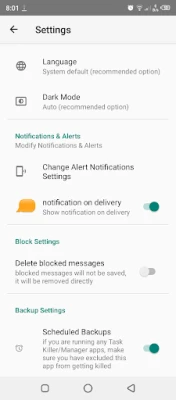
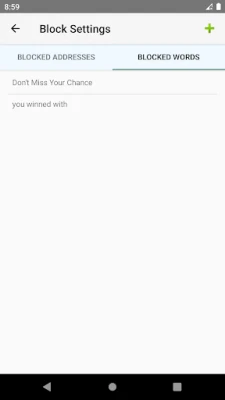
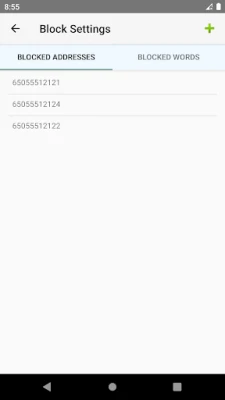
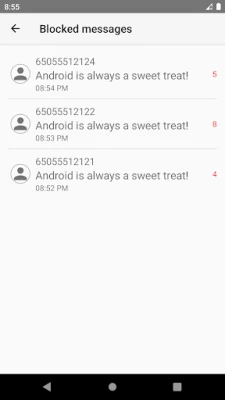
- Blocking and filtering – Unwanted texts can be blocked by contact or filtered by keywords.
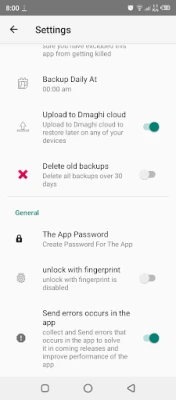
- App lock – Optional password or fingerprint protection adds a layer of privacy.
- Backup and restore – Export your message history and import it later if you change devices.
How it works
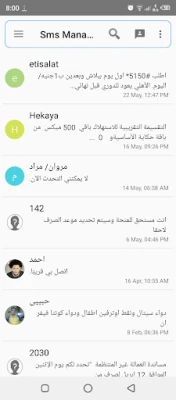
After installing the app, you are prompted to set it as the default SMS handler. Once confirmed, all outgoing texts are routed through Sms Manager Pro, and incoming messages appear in its conversation list. The interface follows a simple layout: a list of contacts at the top, a chat window for each conversation, and a compose bar for new messages. Settings allow you to enable or disable features such as blocking, backup, and app lock.
Practical uses
- Keep personal and work texts separate by using categories or labels.
- Prevent spam by blocking numbers or filtering messages that contain specific words.
- Secure sensitive conversations with a fingerprint‑protected lock.
- Back up important messages before switching phones.
Installation information
Sms Manager Pro is available as a paid download for $4.99. After purchase, the APK installs like any other Android application. You will need to grant the app permission to read and send SMS messages, as well as access storage if you wish to use the backup feature.
Things to know before installing
- The app requires the standard SMS permissions that Android assigns to messaging apps.
- Because it can become the default SMS client, you should ensure you are comfortable with its interface before switching from your current app.
- Backup files are stored locally; you will need to manage them manually if you want to move them to another device or cloud service.
Who may find it useful?
Anyone who prefers a dedicated, ad‑free SMS experience will benefit from Sms Manager Pro. It is especially helpful for users who need extra privacy controls, such as a lock screen for messages, or who want simple tools for blocking unwanted texts.
Frequently asked questions
Can I use Sms Manager Pro alongside my existing messaging app?
You can install the app without setting it as default, but only the default SMS app can send and receive texts directly. If you keep another app as default, Sms Manager Pro will function as a viewer only.
Is my message data encrypted?
The app stores messages in the device’s standard SMS database. Encryption depends on the device’s overall security settings; the optional app lock protects access to the interface.
How do I restore a backup?
From the Settings menu, choose the restore option and locate the previously exported backup file. The app will import the messages into its database.
Rate the App
User Reviews















Popular Apps










 Games
Games Entertainment
 Communication
 E-mail
 Security
 Tools
Tools Media
Media Internet
 Finance
 Design
 Education
 Android Firmwares
 Travel & Local
 Android
 Windows
 Linux
Linux