

Latest Version
September 07, 2026
Dmaghi.com
Communication
Android
6
Free
com.dmaghi.smsfree
Report a Problem
More About Sms Manager – Simple SMS Messaging
What is Sms Manager?
Sms Manager, developed by Dmaghi.com, is a free messaging client for Android devices. It replaces the stock messaging app and provides a dedicated space for sending and receiving SMS text messages. The app is designed to work as the default SMS handler, giving you full control over your text‑message experience.
Main features
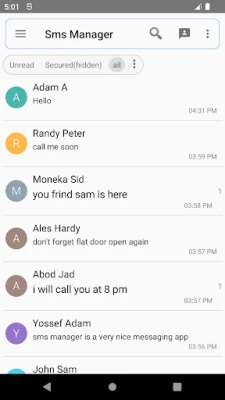
- Conversation view – Messages are grouped by contact, making it easy to follow the flow of each chat.
- Instant send and receive – Texts are delivered as soon as you hit send, and incoming messages appear in real time.
- Default‑app integration – Once set as the default SMS app, Sms Manager handles all outgoing and incoming texts without needing a secondary client.
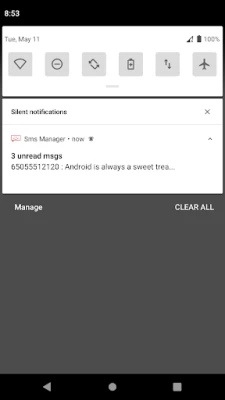
- Notifications – Push notifications alert you to new messages, with options to preview or hide content.
- Simple organization – You can archive or delete conversations to keep your inbox tidy.
How it works
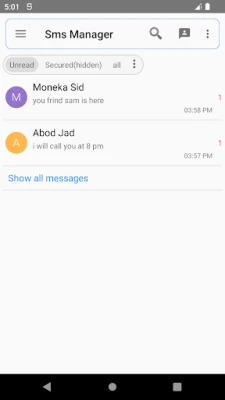
After installing the app, Android will prompt you to select a default messaging application. Choose Sms Manager, and the system will route all SMS traffic through it. The main screen displays a list of recent conversations; tapping a contact opens a chat window where you can type, attach basic media, and send messages. The app uses the device’s native SMS service, so no additional accounts or internet connectivity are required for standard texting.
Practical uses
Sms Manager is useful for anyone who prefers a straightforward, ad‑free texting experience. It works well for:
- Keeping personal and work conversations separate from the stock app.
- Users who want a clean UI without extra promotional content.
- People who need reliable notifications for time‑sensitive messages.
Installation information
Download the APK from a trusted source, then enable installation from unknown sources in your device settings if required. After installation, open the app and follow the on‑screen prompt to set it as the default SMS handler. No additional configuration is necessary for basic texting.
Compatibility
The app is built for Android devices that support the standard SMS framework. It does not rely on specific hardware features, so it should run on most smartphones running a recent version of Android. Because the exact minimum Android version is not listed, users should ensure their device runs a version that supports third‑party default SMS apps (generally Android 4.4 KitKat and later).
Things to know before installing
- Sms Manager does not include built‑in advertising, which helps keep the interface uncluttered.
- The app focuses on SMS only; MMS support, if any, is limited to basic picture or audio attachments.
- All messages are stored locally on the device; there is no cloud backup unless you use a separate backup solution.
Who may find it useful?
Anyone looking for a lightweight, privacy‑respecting alternative to the pre‑installed messaging app will benefit from Sms Manager. It is especially suitable for users who value a simple conversation view and want to avoid extra features that they may never use.
Frequently asked questions
Can I set Sms Manager as my default SMS app?
Yes. During the first launch the app will ask to become the default messaging handler. Accepting this will route all SMS traffic through Sms Manager.
Does the app require an internet connection?
No. SMS messages are sent through your carrier’s cellular network, so an internet connection is not needed for standard texting.
Are there any hidden fees or in‑app purchases?
The core app is free. Any optional premium features would be offered through in‑app purchases, but the basic messaging functionality remains fully usable without payment.
Is my data safe?
Sms Manager stores messages locally on your device and does not include advertising or tracking code. However, as with any local storage, you should back up important conversations using your preferred backup method.
Rate the App
User Reviews















Popular Apps










 Games
Games Entertainment
 Communication
 E-mail
 Security
 Tools
Tools Media
Media Internet
 Finance
 Design
 Education
 IT Tools
 Travel & Local
 Android
 Windows
 Linux
Linux