

Latest Version
Latest
August 02, 2026
Salhi Rateb
Android
489
Free
com.app.smartlivetv
Report a Problem
More About Smart Live TV – Free Global TV Streaming App
What is Smart Live TV?
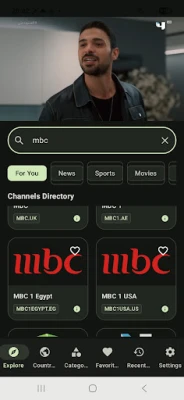
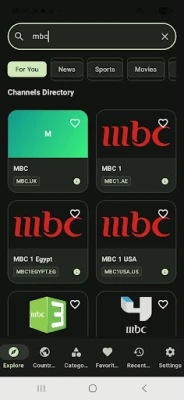
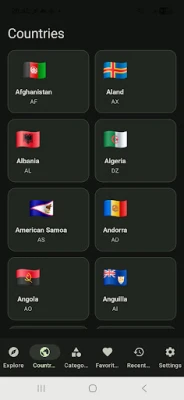
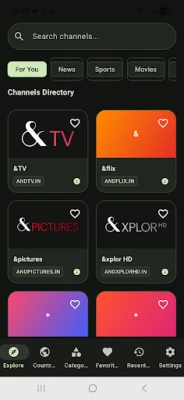
Smart Live TV is a free Android application that lets you watch live television channels from many countries without the need for a cable subscription. Developed by Salhi Rateb, the app aggregates publicly available streams and presents them in a single, easy‑to‑navigate interface.
Main features
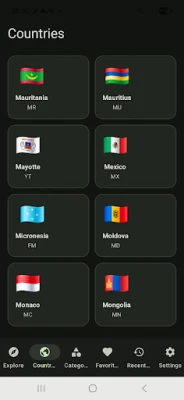
- Broad channel selection – Access channels from regions such as the United States, Europe, Asia, Africa and the Middle East.
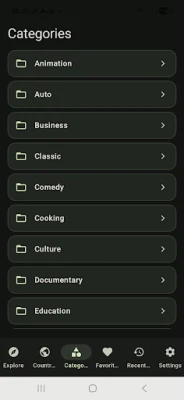
- Simple navigation – Channels are grouped by country and genre, making it quick to find the content you want.
- Free to use – No purchase or subscription is required to start watching.
- Lightweight design – The app focuses on streaming performance rather than heavy graphics, which helps it run smoothly on a range of devices.
How it works
When you launch Smart Live TV, the home screen displays a list of available countries. Tapping a country reveals the channels that are currently available for that region. Selecting a channel opens a built‑in player that starts streaming the live broadcast. The player includes basic controls such as play/pause, volume adjustment and full‑screen mode.
Practical uses
Smart Live TV can be handy in several everyday scenarios:
- Travel – Keep up with news or favorite shows while abroad by selecting channels from your home country.
- Language practice – Watch foreign‑language news or entertainment to improve listening skills.
- Event coverage – Follow live sports, cultural events or breaking news without needing a separate subscription service.
Installation information
The app is distributed as an APK file that can be installed on Android devices. To install:
- Enable Install unknown apps for the source you download from.
- Download the APK file.
- Open the file and follow the on‑screen prompts.
After installation, you can find Smart Live TV in your app drawer and start streaming immediately.
Compatibility
Smart Live TV is built for Android devices. While the exact minimum Android version is not specified, the lightweight design aims to work on both newer smartphones and older models with modest hardware resources.
Things to know before installing
- The app relies on publicly available streams; availability of specific channels may vary by region and over time.
- Streaming quality depends on your internet connection and the source feed.
- Because the app aggregates third‑party streams, it does not control the content or any advertisements that may appear within a broadcast.
Who may find it useful?
Anyone who wants a quick way to browse and watch live TV from multiple countries without committing to a paid service. This includes expatriates, travelers, language learners and casual viewers looking for diverse programming.
Frequently asked questions
Do I need an internet connection?
Yes. Smart Live TV streams content over the internet, so a stable Wi‑Fi or mobile data connection is required.
Is the app safe to use?
The app itself does not request dangerous permissions. However, as with any streaming app, you should ensure you download the APK from a reputable source.
Can I record live TV?
Smart Live TV provides only live playback; recording functionality is not included.
Are there ads?
Advertisements may appear within the streamed channels themselves, as the app does not control the source content.
Rate the App
User Reviews















Popular Apps










 Games
Games Entertainment
 Communication
 E-mail
 Security
 Tools
Tools Media
Media Internet
 Finance
 Design
 Education
 Android Firmwares
 Travel & Local
 Android
 Windows
 Linux
Linux