

Latest Version
Latest
September 07, 2026
Goodwy
Communication
Android
7
Free
com.goodwy.contacts
Report a Problem
More About Right Contacts – Private and Customizable Contact Manager
What is Right Contacts?
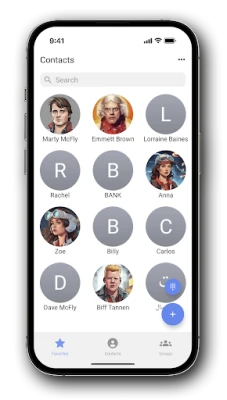
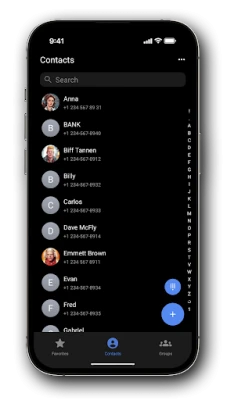
Right Contacts is a free Android application developed by Goodwy that lets you manage your address book with an emphasis on privacy and visual customization. The app provides a dedicated space for your contacts, allowing you to apply themes, colors and other visual tweaks while keeping sensitive entries hidden from other apps.
Main features
- Private contacts – Create entries that are stored only inside Right Contacts and are not exposed to the system contacts list or other applications.
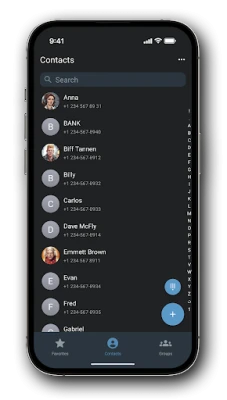
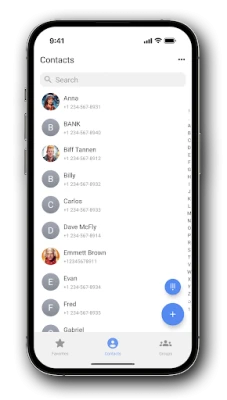
- Custom themes and colors – Choose from a range of built‑in themes or define your own color scheme to make the contact list feel personal.
- Ad‑free experience – The app is free and does not display intrusive advertisements.
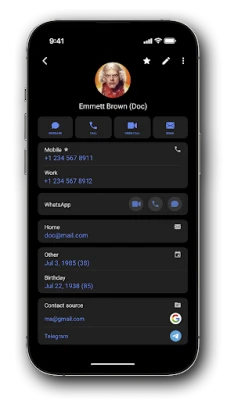
- Messenger integration – Quick shortcuts let you start chats in popular messaging apps directly from a contact entry.
- Intuitive interface – A clean layout and simple navigation make adding, editing and searching contacts straightforward.
How it works
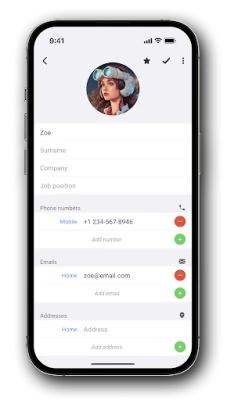
When you launch Right Contacts, the app presents a main screen that lists all stored contacts. You can add a new contact by tapping the plus icon, then fill in fields such as name, phone number, email and any notes you wish to keep. A toggle lets you mark the entry as private, which ensures the data remains confined to the app.
Customization options are available from the settings menu. Here you can select a theme, adjust accent colors, and choose how contact photos are displayed. Changes are applied instantly, so you can see the effect without leaving the app.
Practical uses
- Store personal numbers that you do not want to share with other apps, such as a family emergency line.
- Maintain a separate business contact list that stays out of your regular phone contacts.
- Apply a calming dark theme for night‑time use, or a bright palette for daytime visibility.
- Quickly start a WhatsApp, Telegram or other messenger conversation with a single tap.
Installation information
Right Contacts can be downloaded from the Appitika store. After installation, the app requests standard permissions needed to read and write contacts within its own database. No additional permissions are required to access system contacts unless you choose to import existing entries.
Things to know before installing
- The app stores private contacts only inside its own storage; they will not appear in the default Android contacts app.
- Because the app is free and ad‑free, there are no in‑app purchases or subscription fees.
- Backup of private contacts is not handled automatically; consider exporting your data periodically if you need an external copy.
Who may find it useful?
Anyone who wants a clear separation between public and private contact information will benefit from Right Contacts. It is especially handy for users who share their device with family members, manage separate work and personal networks, or simply enjoy a more personalized look for their address book.
Frequently asked questions
Can I import contacts from the system address book?
Yes. Right Contacts offers an import option that copies selected entries into the app’s database. Imported contacts behave like regular entries and can be marked private after import.
Is my data synced to the cloud?
The app does not include built‑in cloud sync. All contacts remain on the device unless you manually export them.
Will the app work on older Android versions?
Right Contacts is designed for modern Android devices. Specific minimum version requirements are listed on the download page; if your device meets the standard Play Store criteria, the app should install and run.
How do I change the theme?
Open the settings menu, select “Appearance,” and choose from the available themes or define custom colors. Changes take effect immediately.
Rate the App
User Reviews














Popular Apps










 Games
Games Entertainment
 Communication
 E-mail
 Security
 Tools
Tools Media
Media Internet
 Finance
 Design
 Education
 IT Tools
 Travel & Local
 Android
 Windows
 Linux
Linux