



Latest Version
August 13, 2026
Opera
Communication
Android
362
Free
com.opera.browser
Report a Problem
More About Opera: Private Web Browser – Fast, Secure Android Browsing
What is Opera: Private Web Browser?
Opera: Private Web Browser is a free Android application developed by Opera. It provides a full‑featured web browsing experience while emphasizing privacy and performance. The app replaces the default system browser and adds tools that help users stay in control of their online activity.
Main Features
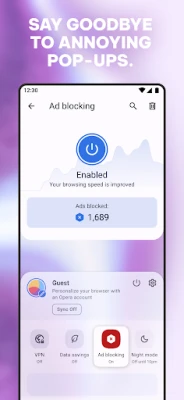
- Built‑in ad blocker – blocks most intrusive ads and pop‑ups, which can speed up page loading and reduce battery drain.
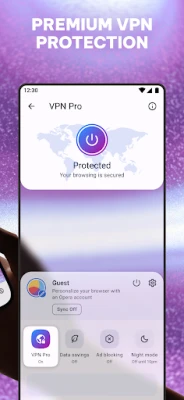
- Integrated VPN – encrypts the connection and masks the device’s IP address, offering an extra layer of privacy without requiring a separate subscription.
- Data‑saving mode – compresses web traffic to lower data usage, useful on limited plans or slow networks.
- Offline pages – lets users save complete web pages for later reading when a connection is unavailable.
- Download manager – handles video, audio and file downloads, with background support and automatic resume.
How It Works
When you open a link, Opera loads the page through its own rendering engine. The ad blocker filters requests based on known ad sources, while the VPN routes traffic through encrypted tunnels. Data‑saving mode applies compression before the page reaches the device, which can make images load faster and consume less bandwidth.
Practical Uses
- Traveling on a limited data plan – the data‑saving mode stretches your allowance.
- Public Wi‑Fi – the VPN helps protect personal information on unsecured networks.
- Reading long articles or reference material – offline pages let you continue without an internet connection.
- Watching videos with fewer interruptions – the ad blocker reduces on‑screen ads.
Installation Information
The app can be downloaded from the Google Play Store using the package name com.opera.browser. After installation, the browser will request permissions needed for network access, storage (for downloads and offline pages), and VPN configuration. Granting these permissions enables the full set of features.
Compatibility
Opera is designed for Android devices that meet the standard system requirements for modern apps. It runs on most smartphones and tablets that support the Google Play ecosystem. Specific version numbers are not required for the description.
Things to Know Before Installing
- The VPN feature works without a separate account, but it may be limited to certain server locations.
- Ad blocking is enabled by default, but users can adjust filter settings in the app’s preferences.
- Data‑saving mode may affect image quality; it can be toggled on or off per site.
Who May Find It Useful?
Anyone who wants a faster, less cluttered browsing experience on Android will benefit. The app is especially helpful for users who frequently connect to public Wi‑Fi, have limited data plans, or simply prefer a cleaner interface without third‑party extensions.
Frequently Asked Questions
Is the VPN truly free?
Yes, the built‑in VPN does not require a subscription, though it may have usage limits compared to premium services.
Can I sync bookmarks with a desktop version of Opera?
Opera offers a sync feature that can link bookmarks, passwords and tabs across devices when you sign in with an Opera account.
Does the ad blocker affect website functionality?
In most cases the blocker removes only unwanted ads. If a site stops working, you can temporarily disable the blocker for that site.
How does the offline page feature store content?
When you save a page, the browser stores the HTML, images and styling locally, allowing you to view the page without an internet connection.
Rate the App
User Reviews















Popular Apps










 Games
Games Entertainment
 Communication
 E-mail
 Security
 Tools
Tools Media
Media Internet
 Finance
 Design
 Education
 Android Firmwares
 Travel & Local
 Android
 Windows
 Linux
Linux