

Latest Version
September 17, 2026
Verizon Business Group
Communication
Android
3
Free
verizon.vesmobile
Report a Problem
More About My Verizon for Enterprise – Manage Your Business Services on Android
What is My Verizon for Enterprise?
My Verizon for Enterprise is a mobile tool designed for authorized Verizon business customers. It brings core account‑management functions to a smartphone, allowing users to stay connected with their service portfolio while away from the office.
Main features
- Account overview – See a summary of all active Verizon services, including voice, data, and networking solutions.
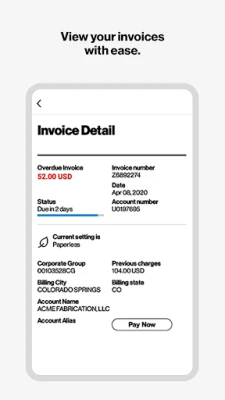
- Invoice and billing access – View current charges, download statements, and switch to paperless billing with a few taps.
- Service ticket management – Open new repair or support tickets, monitor their status, and receive updates directly in the app.
- Inventory insight – Review details of owned equipment, track serial numbers, and see pending change requests.
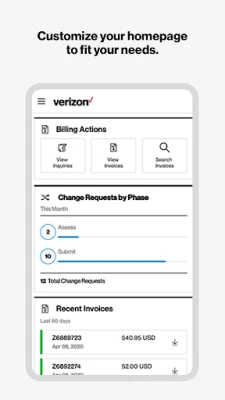
- Customizable home screen – Arrange widgets and shortcuts to surface the information you use most often.
- Secure login – Use device‑level authentication such as fingerprint or facial recognition to protect access.
How it works
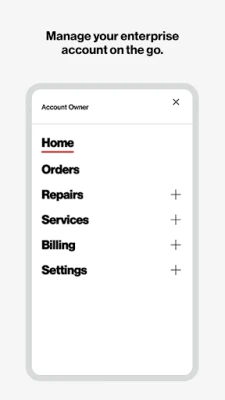
After installing the app, users sign in with their Verizon enterprise credentials. The app then pulls data from the Verizon Enterprise Center, presenting it in a mobile‑optimized layout. Navigation is organized around tabs that correspond to the major functions: Dashboard, Invoices, Tickets, and Inventory. Each section offers drill‑down views, allowing you to tap an item for more detail or to take action, such as submitting a new ticket or requesting a service change.
Practical uses
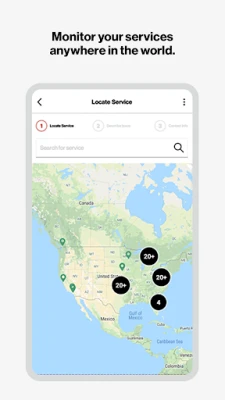
- Field technicians can verify service locations and open repair tickets without returning to a desktop.
- Finance teams can approve or review invoices while traveling.
- Account managers can quickly check inventory status before client meetings.
- IT administrators can monitor active service requests and ensure SLA compliance on the go.
Installation information
The app is distributed as a free download through the Google Play Store. Search for "My Verizon for Enterprise" or use the package name verizon.vesmobile to locate it. Installation follows the standard Android process: tap Install, grant any required permissions, and launch the app once the download completes.
Things to know before installing
- The app requires an active Verizon enterprise account; only authorized users can log in.
- Internet connectivity (Wi‑Fi or cellular) is needed for the initial sign‑in and for synchronizing data.
- Device authentication methods (PIN, password, fingerprint, or face unlock) must be enabled to use the app’s biometric login option.
Who may find it useful?
Business customers who rely on Verizon’s enterprise solutions—such as telecom managers, finance personnel, field service staff, and IT administrators—will benefit from the ability to manage accounts, track tickets, and access billing information without a desktop computer.
Frequently asked questions
Do I need a separate Verizon account for this app?
Yes. The app works with the credentials of an existing Verizon enterprise account. It does not create a new consumer‑level account.
Can I use the app on any Android device?
The app runs on devices that meet the standard Android version requirements for Google Play apps. Specific version numbers are listed on the store page.
Is my data protected?
Access is secured through the same authentication mechanisms used by the Verizon Enterprise Center, and the app supports biometric login where the device allows it.
What should I do if I forget my password?
Use the password‑reset link on the Verizon Enterprise Center login page. After resetting, you can sign in to the app with the new credentials.
Rate the App
User Reviews















Popular Apps










 Games
Games Entertainment
 Communication
 E-mail
 Security
 Tools
Tools Media
Media Internet
 Finance
 Design
 Education
 IT Tools
 Travel & Local
 Android
 Windows
 Linux
Linux