


Latest Version
Latest
August 21, 2026
Microsoft Corporation
Communication
Android
108
Free
com.microsoft.emmx.dev
Report a Problem
More About Microsoft Edge Dev – Early‑Access Browser for Android
What is Microsoft Edge Dev?
Microsoft Edge Dev is the development preview of the Edge browser for Android. It lets users explore upcoming changes, new UI tweaks, and experimental web technologies before they reach the stable release.
Main features
- Early access to new features – Test the latest browsing enhancements, performance improvements, and design updates as they are being built.
- Sync with your Microsoft account – When you sign in, bookmarks, passwords, and reading lists can be synchronized across devices.
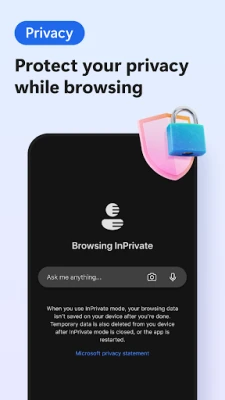
- Built‑in privacy tools – Access tracking protection, InPrivate browsing, and control over site permissions.
- Feedback channel – Integrated feedback options let you report bugs or suggest improvements directly to the Edge team.
How it works
After installing the app, you can browse the web just like with any other browser. The Dev channel receives frequent updates that may introduce new UI elements or experimental APIs. Because it is a preview, occasional instability or minor glitches can occur, which is expected for a development build.
Practical uses
- Web developers who want to test how their sites behave with upcoming Edge features.
- Enthusiasts interested in the evolution of Microsoft’s browser on mobile.
- Users who enjoy trying new tools before they become mainstream.
Installation information
The app can be installed from the Google Play Store. Search for "Microsoft Edge Dev" or use the package name com.microsoft.emmx.dev. The download size and required Android version are shown on the store page.
Compatibility
Microsoft Edge Dev requires Android devices that meet the minimum specifications listed on the Play Store. It is designed for smartphones and tablets that support the standard Android runtime.
Things to know before installing
- As a preview build, the app may receive updates multiple times per week.
- Features are experimental and may change or be removed before reaching the stable channel.
- Data such as browsing history and saved passwords are stored locally until you sign in with a Microsoft account.
Who may find it useful?
Anyone who wants to stay ahead of the curve with Microsoft’s web browser, especially developers, power users, and early adopters, will benefit from the Edge Dev channel.
Frequently asked questions
Is the Dev version safe to use?
Yes, it is an official build from Microsoft Corporation. However, because it is a development preview, occasional bugs are possible.
Can I switch back to the stable Edge app?
Yes. Installing the regular Microsoft Edge app from the Play Store will replace the Dev version without affecting your synced data.
How do I send feedback?
Open the app menu, select "Help & Feedback," and choose the appropriate option to report an issue or suggest a feature.
Rate the App
User Reviews















Popular Apps










 Games
 Entertainment
 Communication
 E-mail
 Security
 Tools
 Media
 Internet
 Finance
 Design
 Education
 Android Firmwares
 Travel & Local
 Android
 Windows
 Linux