




Latest Version
Latest
September 13, 2026
LiveMe+ Team
Communication
Android
9
Free
com.plusme.live
Report a Problem
More About LiveMe+: Live Stream & Go Live
What is LiveMe+?
LiveMe+ is a mobile platform that brings live video streaming to Android devices. Users can either watch a wide variety of live broadcasts or start their own stream with a single tap. The app focuses on real‑time interaction, allowing viewers to comment, send virtual gifts, and join chat rooms while creators share moments from their daily lives, hobbies, or special events.
Main features
- Instant live broadcasting – Start a live video from your phone in seconds, with options to add filters and effects.
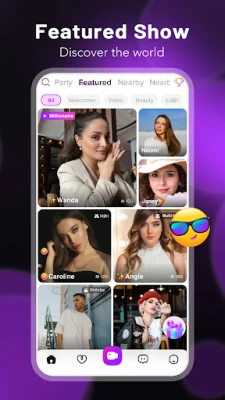
- Live viewer community – Browse thousands of active streams across categories such as music, gaming, cooking, and travel.
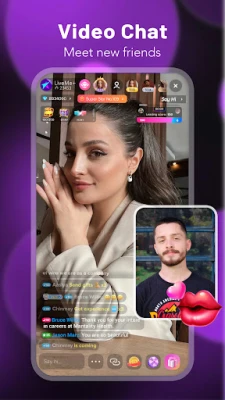
- Interactive chat – Send comments, emojis, and virtual gifts to support creators during a broadcast.
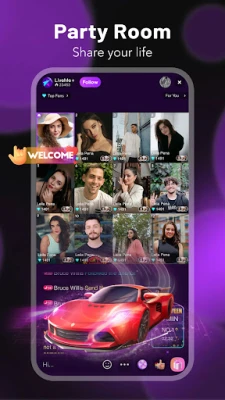
- Group video calls – Invite friends to a multi‑beam video chat with up to nine participants.
- Voice chat rooms – Join audio‑only rooms for karaoke, language practice, or casual conversation.
- Head‑to‑head challenges – Participate in live PK (player‑vs‑player) contests where creators compete for audience gifts.
How it works
After installing LiveMe+, you create a simple profile using an email address or social login. The home screen displays a curated feed of live streams based on your interests and activity. Tapping a stream opens a full‑screen view with a live chat overlay. To start your own broadcast, tap the “Go Live” button, choose a title, and optionally enable filters or background music. Viewers can interact through text chat, send virtual gifts, or join a group video call if you enable that mode.
Practical uses
- Content creators can reach an audience without needing complex equipment.
- Fans enjoy real‑time access to performances, tutorials, or casual hangouts.
- Community building is supported through voice rooms and group video chats, making it easy to meet people with shared interests.
Installation information
The app is distributed as a free download from the Google Play Store. Search for “LiveMe+: Live Stream & Go Live” or use the package name com.plusme.live. Installation follows the standard Android process: tap “Install,” grant the requested permissions, and launch the app from your app drawer.
Things to know before installing
- Live streaming consumes significant data; consider using Wi‑Fi for longer broadcasts.
- The app may request access to your camera, microphone, and storage to enable video capture and gift handling.
- Content is user‑generated, so the experience can vary widely between streams.
Who may find LiveMe+ useful?
Anyone interested in real‑time video interaction can benefit from LiveMe+. This includes aspiring influencers, gamers who want to share gameplay, hobbyists looking to showcase skills, and viewers who enjoy discovering new talent live.
Frequently asked questions
Do I need a powerful device to stream?
LiveMe+ works on most modern Android phones. While higher‑end devices provide smoother video quality, the app adapts to the capabilities of your hardware.
Can I earn money through the app?
Viewers can send virtual gifts that creators can later convert within the app’s ecosystem. Specific payout details are managed by LiveMe+ and are not disclosed here.
Is the app safe for younger users?
LiveMe+ includes moderation tools and community guidelines, but parental supervision is recommended for younger audiences.
Rate the App
User Reviews















Popular Apps










 Games
Games Entertainment
 Communication
 E-mail
 Security
 Tools
Tools Media
Media Internet
 Finance
 Design
 Education
 IT Tools
 Travel & Local
 Android
 Windows
 Linux
Linux