

Latest Version
Latest
September 02, 2026
Telrite Holdings, Inc
Communication
Android
9
Free
com.telrite.lifewireless
Report a Problem
More About Life Wireless – Manage Your Lifeline Service on Android
What is Life Wireless?
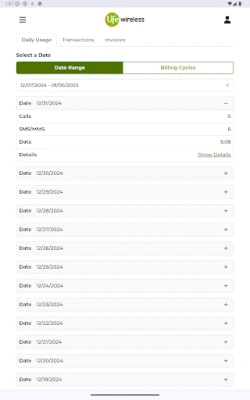
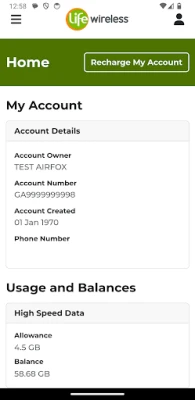
Life Wireless is an Android application created by Telrite Holdings, Inc. for customers who subscribe to the Life Wireless service. The app provides a convenient way to keep track of your mobile plan, review usage statistics, and make changes to your account without needing to call customer support.
Main features
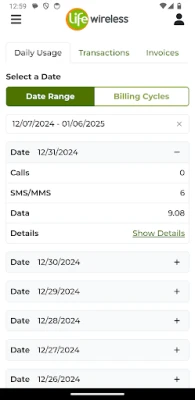
- Usage overview – See current talk, text and data consumption at a glance.
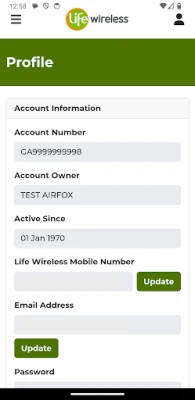
- Account updates – Edit personal information, change billing preferences, and manage notification settings.
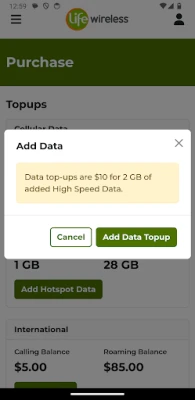
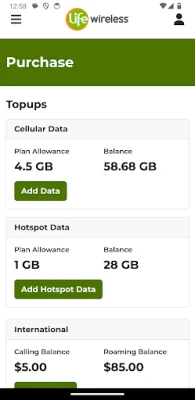
- Add‑on purchases – Buy extra data packs, international minutes or other optional services directly from the app.
- Top‑up capability – Add credit to your account when you need more minutes or data.
- Support access – Reach the Life Wireless support team through in‑app messaging or contact links.
- Notifications – Receive alerts about plan changes, promotional offers or important service updates.
How it works
After installing the app, you sign in with the credentials you use for your Life Wireless account. The dashboard then pulls the latest usage data from the carrier’s backend and displays it in easy‑to‑read charts. When you select an option such as “Buy Add‑on,” the app presents the available packages, lets you choose a quantity, and processes the purchase through the payment method stored in your account.
Practical uses
- Monitor your data limit to avoid unexpected overage charges.
- Quickly add a weekend data boost before a trip.
- Update your mailing address after moving without waiting on a phone call.
- Check the status of a recent top‑up or purchase.
- Get notified when a new promotion that matches your usage pattern becomes available.
Installation information
The app is distributed as a free download from the Google Play Store. Search for “Life Wireless” or use the package name com.telrite.lifewireless to locate the correct listing. Tap “Install” and wait for the download to complete. No additional files are required.
Things to know before installing
- The app requires an Android device with a Google Play Services connection to authenticate your account.
- All transactions performed in the app are processed through the Life Wireless billing system; standard carrier rates apply.
- Data shown in the app reflects the most recent update from the network and may have a short delay of a few minutes.
Who may find it useful?
Existing Life Wireless customers who prefer managing their service on a mobile device will benefit most. The app is also handy for new subscribers who want to explore plan options, track their introductory usage, or set up recurring top‑ups.
Frequently asked questions
Do I need an internet connection to view my usage?
Yes. The app syncs with the carrier’s servers, so a data or Wi‑Fi connection is required for the most up‑to‑date information.
Can I use the app on a tablet?
As long as the tablet runs Android and supports Google Play, the app functions the same way as on a phone.
Is there a way to set usage alerts?
Within the settings you can enable notifications that warn you when you approach a predefined percentage of your talk, text or data allowance.
What payment methods are accepted for add‑ons?
The app uses the payment information already stored in your Life Wireless account, which typically includes credit cards or carrier‑linked billing.
Rate the App
User Reviews














Popular Apps










 Games
Games Entertainment
 Communication
 E-mail
 Security
 Tools
Tools Media
Media Internet
 Finance
 Design
 Education
 IT Tools
 Travel & Local
 Android
 Windows
 Linux
Linux