


Latest Version
August 17, 2026
8x8, Inc
Communication
Android
99
Free
org.jitsi.meet
Report a Problem
More About Jitsi Meet – Free Video Conferencing for Android
What is Jitsi Meet?
Jitsi Meet is a free, open‑source video‑conferencing app for Android devices. Developed by 8x8, Inc., it enables individuals and groups to launch high‑quality audio and video meetings directly from their phones. Because the service runs in the cloud, there is no need to install additional server software or maintain a private infrastructure.
Main features
- No account required – you can start or join a meeting simply by entering a room name or URL.
- Unlimited participants – the app does not impose a hard limit on the number of attendees; capacity depends on the underlying server resources.
- Password‑protected rooms – you can set a meeting password to restrict access.
- End‑to‑end encryption – calls are encrypted by default, helping protect the privacy of your conversations.
- High‑quality media – audio uses the Opus codec and video uses VP8, delivering clear sound and smooth video.
- Browser compatibility – participants can join from a web browser without installing the app, simply by following a shared link.
How it works
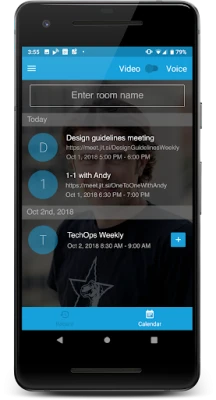
When you open Jitsi Meet, you are prompted to create a new meeting or enter an existing one. The app generates a unique, human‑readable URL (for example, https://meet.jit.si/TeamSync) that you can share via any messaging platform. Once participants click the link, they are connected to the same conference room hosted on Jitsi’s public servers. The app handles signaling, media routing, and encryption automatically, so you can focus on the conversation.
Practical uses
Jitsi Meet is suitable for a wide range of scenarios:
- Remote work – hold team stand‑ups, project reviews, or client presentations without needing a corporate account.
- Family gatherings – connect with relatives across different locations for celebrations or casual chats.
- Education – teachers can create virtual classrooms and invite students with a simple link.
- Community events – clubs, hobby groups, or NGOs can host webinars or workshops without registration hurdles.
Installation information
The app is distributed through the Google Play Store. Search for “Jitsi Meet” or use the package name org.jitsi.meet to locate the official listing. Tap “Install” and wait for the download to complete. The installation size is modest, and the app does not require additional permissions beyond those needed for microphone, camera, and network access.
Compatibility
Jitsi Meet runs on Android devices that support the standard Google Play services framework. While the exact minimum Android version is not specified here, the app typically works on devices running Android 5.0 (Lollipop) and newer, provided they have a functional camera, microphone, and internet connection.
Things to know before installing
- Meetings are hosted on public Jitsi servers unless you configure a private server yourself.
- Because no account is required, anyone with the meeting link can join unless you set a password.
- Performance depends on network quality; a stable Wi‑Fi or cellular connection improves video stability.
Who may find Jitsi Meet useful?
Anyone who needs quick, secure video communication without the overhead of account management will benefit from Jitsi Meet. This includes freelancers, small businesses, educators, non‑profits, and casual users who value privacy and flexibility.
Frequently asked questions
Do I need to create an account?
No. You can start or join a meeting instantly by entering a room name or URL.
Is the connection encrypted?
Yes. Calls are encrypted by default, providing a baseline level of privacy.
Can I use Jitsi Meet on a desktop?
Absolutely. The same meeting URLs work in web browsers, allowing participants to join from laptops or desktops without installing anything.
What if I want a private server?
Jitsi is open source, so you can deploy your own instance if you need full control over data and resources.
Rate the App
User Reviews















Popular Apps










 Games
Games Entertainment
 Communication
 E-mail
 Security
 Tools
Tools Media
Media Internet
 Finance
 Design
 Education
 Android Firmwares
 Travel & Local
 Android
 Windows
 Linux
Linux