

Latest Version
Latest
September 15, 2026
Muster Apps
Communication
Android
6
Free
com.musterapps.hidebluetick
Report a Problem
More About Hide Blue Ticks – Read WhatsApp Messages Incognito
What is Hide Blue Ticks?
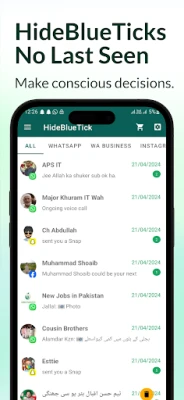
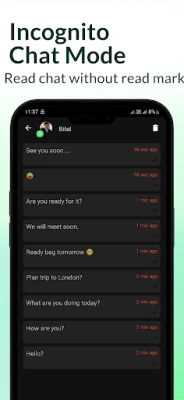
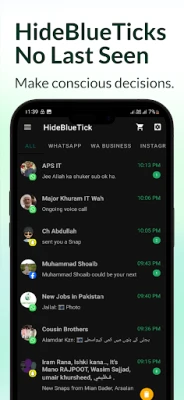
Hide Blue Ticks is a free Android utility that lets you peek at new WhatsApp messages without triggering the usual blue double‑tick read receipt or updating your last‑seen timestamp. The app works in the background and uses notification access to capture incoming chat notifications, presenting them in a separate view.
Main features
- Read messages silently – Open a notification copy of a WhatsApp chat without opening the official app.
- No blue ticks – Your contacts will not see the read indicator.
- Last‑seen protection – Your online status remains unchanged.
- No need for offline mode – The app works while you stay connected to the internet.
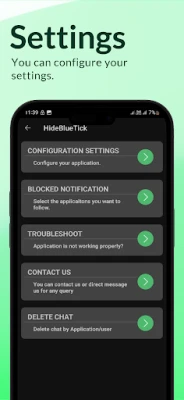
- Simple permission model – Only notification‑access permission is required.
How it works
When a new WhatsApp message arrives, Android posts a notification. Hide Blue Ticks reads that notification, extracts the message text and sender information, and displays it inside its own interface. Because the original WhatsApp app is never opened, the platform does not send a read receipt back to the sender.
Practical uses
- Check a message quickly during a meeting without alerting the sender.
- Maintain privacy when you want to browse chats without appearing online.
- Verify the content of a notification before deciding whether to open WhatsApp.
Installation information
Download the APK from a trusted source, install it, and grant the requested notification‑access permission when prompted. After enabling the permission, the app will start showing incoming WhatsApp messages in its own list.
Things to know before installing
- The app can only display messages that arrive after it has been set up; earlier messages are not retroactively available.
- It does not modify WhatsApp itself, so any changes to WhatsApp’s notification format may affect functionality.
- Only one permission is required, but you should review the permission request to ensure you are comfortable with granting notification access.
Who may find it useful?
Anyone who wants to keep their read status private – for example, professionals who need to stay discreet during work hours, or users who prefer to read messages without the social pressure of immediate replies.
Frequently asked questions
Will Hide Blue Ticks affect my WhatsApp account?
No. The app only reads notifications; it does not interact with WhatsApp’s servers or alter account settings.
Do I need to be offline to use the app?
No. The app works while you remain online, because it relies on notifications rather than network state.
Can I see messages that were deleted by the sender?
The app shows the content of the notification at the time it was received. If a message is deleted before the notification is posted, it will not appear.
Rate the App
User Reviews















Popular Apps










 Games
Games Entertainment
 Communication
 E-mail
 Security
 Tools
Tools Media
Media Internet
 Finance
 Design
 Education
 IT Tools
 Travel & Local
 Android
 Windows
 Linux
Linux