

Latest Version
Latest
September 02, 2026
Google LLC
Communication
Android
7
Free
com.google.android.apps.wear.companion
Report a Problem
More About Google Pixel Watch – Companion App for Android
What is the Google Pixel Watch app?
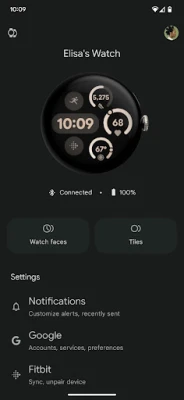
The Google Pixel Watch app is a companion tool that lets you configure and control your Pixel Watch directly from an Android phone. It acts as the bridge between the watch hardware and the services you use daily, such as Google Assistant, Google Wallet, and the notification system.
Main capabilities
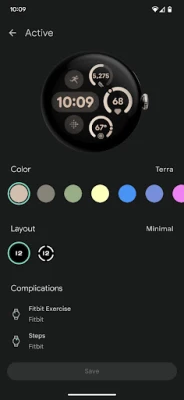
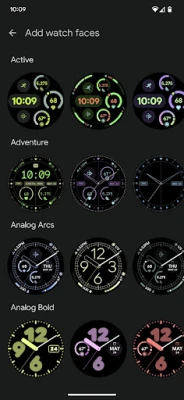
- Watch‑face customization – Choose from the available faces, adjust colors and complications, and preview changes before applying them.
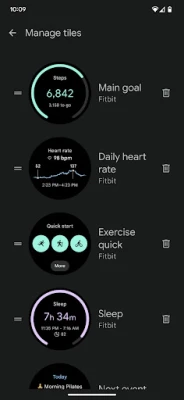
- Tile management – Add, reorder, or remove tiles that give quick access to weather, calendar, fitness data, and other Google services.
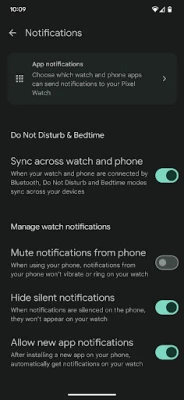
- Notification settings – Decide which apps can push alerts to your watch, set quiet hours, and fine‑tune vibration patterns.
- Google account integration – Sign in with your Google account to sync contacts, calendar events, and other personal data.
- App installation – Browse compatible Wear OS apps, install them, and manage updates without leaving your phone.
- Assistant and Wallet setup – Enable Google Assistant voice commands and configure Google Wallet for contactless payments.
How it works
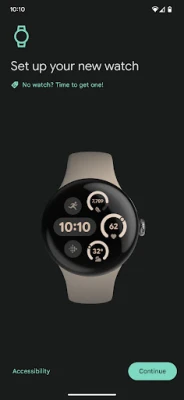
After installing the app, it pairs with a Pixel Watch that is already linked to the same Google account. The pairing process uses Bluetooth and, when available, Wi‑Fi or cellular connections to keep settings synchronized. Once paired, any change you make in the app—such as selecting a new watch face—appears on the watch within seconds.
Practical uses
- Prepare your watch before you leave the house: set a quiet‑mode schedule, choose a face that shows the next calendar event, and enable quick‑access tiles for navigation.
- Keep your watch up to date: install new Wear OS apps or update existing ones without needing to interact with the watch screen.
- Control notifications: silence work‑related alerts during meetings while still receiving personal messages.
Installation information
The app is available for free on the Google Play Store. Search for “Google Pixel Watch” or use the package name com.google.android.apps.wear.companion. Tap “Install” and follow the on‑screen prompts to grant the required permissions, such as Bluetooth and location, which are needed for pairing.
Compatibility
The companion app requires an Android device running version 8.0 (Oreo) or newer. It works best on phones that support Bluetooth Low Energy, as this technology reduces power consumption during the pairing process.
Things to know before installing
- Some features, like carrier setup, are limited to specific regions and carriers. Availability may vary.
- The app does not replace the watch’s own settings menu; it simply provides a convenient way to manage those settings from your phone.
- Permissions for contacts, calendar, and location are optional but enable deeper integration with Google services.
Who may find it useful?
Anyone who owns a Google Pixel Watch and wants a straightforward way to personalize the device without navigating small watch screens. It is especially handy for users who frequently change watch faces, manage multiple tiles, or need precise control over notifications.
Frequently asked questions
Do I need a Google account to use the app?
Yes. The app syncs your watch settings with the Google services tied to your account.
Can I use the app with non‑Pixel Wear OS watches?
The app is designed for the Google Pixel Watch. While some basic functions may work with other Wear OS devices, full feature support is limited to the Pixel Watch.
What if I lose Bluetooth connection?
The app will indicate the connection status. You can reconnect by opening the app and selecting “Reconnect” or by restarting Bluetooth on your phone.
Rate the App
User Reviews















Popular Apps










 Games
Games Entertainment
 Communication
 E-mail
 Security
 Tools
Tools Media
Media Internet
 Finance
 Design
 Education
 IT Tools
 Travel & Local
 Android
 Windows
 Linux
Linux