



Latest Version
Latest
August 12, 2026
Google LLC
Communication
Android
271
Free
Report a Problem
More About Google Meet – Secure Video Meetings for Android
What is Google Meet?
Google Meet is a video‑conferencing app from Google LLC that lets Android users start or join virtual meetings. It works with a Google account, so you can connect with friends, family, classmates, or coworkers without needing separate login credentials.
Main features
- High‑quality video and audio – Adaptive streaming adjusts picture quality to match network conditions.
- Screen sharing – Present slides, documents, or any app screen directly from your device.
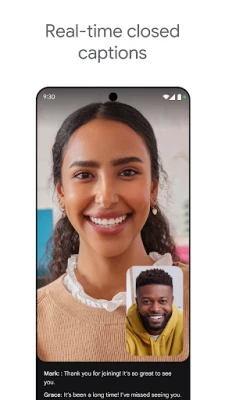
- Live captions – Real‑time captions are generated for spoken words, helping participants follow the conversation.
- Background blur and virtual backgrounds – Keep your environment private or add a professional backdrop.
- Integrated chat – Send text messages to participants while the video is running.
- Meeting links – Share a simple URL to invite others; no additional software is required.
How it works
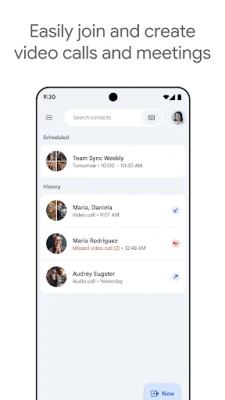
After installing the app, sign in with your Google account. You can create a new meeting from the main screen, which generates a unique link. Share that link via messaging, email, or calendar invites. Participants tap the link, and the app opens the meeting automatically. During the call you can toggle your camera, mute the microphone, switch between front and rear cameras, and use the chat pane.
Practical uses
- Family catch‑ups – Connect with relatives across distances using a single link.
- Remote work – Join team meetings, present reports, or collaborate on documents shared through Google Workspace.
- Online learning – Teachers can host virtual classrooms, share screens, and use captions for accessibility.
Installation information
Google Meet is available from the Google Play Store. Search for “Google Meet” and tap Install. The app requires a Google account for full functionality; you can use an existing Gmail address or create a new one during setup.
Compatibility
The app runs on Android devices that support the Google Play Services framework. Specific minimum Android version information is not disclosed, but the app is regularly updated to support recent Android releases.
Things to know before installing
- Some advanced features, such as meeting recording or extended caption languages, may be limited to paid Google Workspace accounts.
- Internet connectivity is required; the app adapts to both Wi‑Fi and cellular networks.
- Permissions include camera, microphone, and storage access for screen sharing and optional background images.
Who may find it useful?
Anyone who needs a reliable way to hold video calls on Android – from casual users staying in touch with friends to professionals conducting remote meetings – will benefit from Google Meet’s integration with Google services and its straightforward interface.
Frequently asked questions
Do I need a Google Workspace subscription?
No. A personal Google account provides free access to basic meeting features. Paid subscriptions unlock additional tools such as larger participant limits and recording.
Can I join a meeting without the app?
Yes. Meeting links open in a web browser, but using the app offers a smoother experience and access to all Android‑specific controls.
Is the app safe to use?
Google Meet uses encrypted connections for video and audio streams, and meeting links are private to invited participants.
Rate the App
User Reviews















Popular Apps










 Games
Games Entertainment
 Communication
 E-mail
 Security
 Tools
Tools Media
Media Internet
 Finance
 Design
 Education
 Android Firmwares
 Travel & Local
 Android
 Windows
 Linux
Linux