
Latest Version
August 13, 2026
Google LLC
Communication
Android
288
Free
com.google.android.gm.lite
Report a Problem
More About Gmail Go – Light‑weight Email for Android
What is Gmail Go?
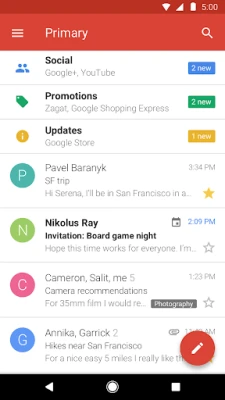
Gmail Go is a compact edition of Google’s popular email service, built especially for Android phones with limited storage or slower connections. It keeps the core Gmail experience—sending, receiving, and organizing messages—while using fewer resources than the full app.
Main features
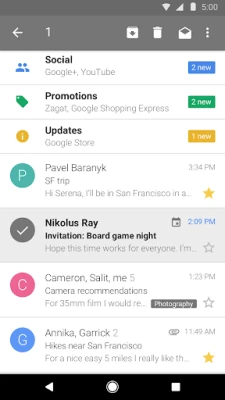
- Focused inbox: Important messages from contacts appear first, while promotional or social mail is grouped separately.
- Offline access: Read previously synced messages without an active data connection.
- Quick notifications: Get alerts when new mail arrives, so you stay up‑to‑date without opening the app.
- Simple attachment handling: Attach photos, documents, or other files directly from the device.
- Search: Find specific emails using keywords, sender names, or dates.
How it works
After installing Gmail Go, you sign in with your Google account or add other email addresses that support IMAP or POP. The app synchronizes a limited set of recent messages, which reduces data usage and speeds up loading. When you open a conversation, the content is cached locally, allowing you to read it later even if you lose connectivity.
Practical uses
- Ideal for users with low‑capacity phones or limited data plans.
- Provides a functional email client in regions where high‑speed internet is not always available.
- Offers a quick way to check work or personal messages without the overhead of the full Gmail app.
Installation information
The app can be downloaded from the Google Play Store. Because it is free, there is no purchase required. Ensure you have enough free space on your device; the lightweight design typically occupies only a few megabytes.
Compatibility
Gmail Go runs on Android devices that meet the minimum system requirements set by Google. While specific version numbers are not listed here, the app is intended for devices with modest hardware specifications.
Things to know before installing
- Some advanced Gmail features—such as custom themes, extensive label management, or integration with Google Workspace add‑ons—may not be available.
- The storage quota for your Google account remains the same (15 GB free for new accounts), but the app itself stores only a subset of your messages.
- Push notifications depend on the device’s background data settings; disabling background data may delay alerts.
Who may find Gmail Go useful?
Anyone who wants reliable email on a budget‑friendly device can benefit from Gmail Go. This includes students, travelers, users in emerging markets, and anyone who prefers a faster, less resource‑intensive email client.
Frequently asked questions
Does Gmail Go support multiple email accounts?
Yes, you can add both Gmail addresses and other email accounts that use standard IMAP or POP protocols.
Can I use Gmail Go without an internet connection?
You can read messages that have already been synced. Sending new mail or refreshing the inbox requires a connection.
Is my data safe?
Gmail Go follows Google’s standard security practices for email transmission and storage. It does not store passwords on the device.
Will I lose any emails by switching to Gmail Go?
No. All messages remain in your Google account and are accessible from any Gmail client.
Rate the App
User Reviews















Popular Apps










 Games
Games Entertainment
 Communication
 E-mail
 Security
 Tools
Tools Media
Media Internet
 Finance
 Design
 Education
 Android Firmwares
 Travel & Local
 Android
 Windows
 Linux
Linux