
Latest Version
Latest
June 20, 2026
Google LLC
Android
569
Free
com.google.android.gm
Report a Problem
More About Gmail – Email, AI‑Powered Inbox & Calendar
What is Gmail?
Gmail is Google’s free email service, packaged as a native Android app. It lets you send, receive, and organize messages from any device, while leveraging Google’s cloud infrastructure for speed and reliability.
Key features
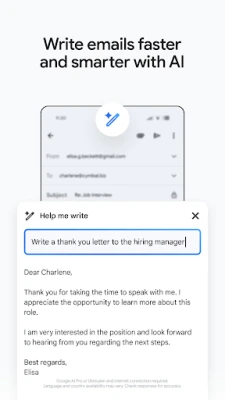
- AI‑assisted writing – Gemini‑powered suggestions help you compose replies, finish sentences, and create professional messages faster.
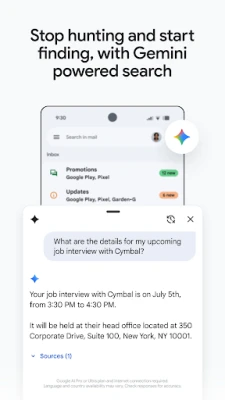
- Smart search – Type keywords or ask the assistant to locate specific information across your inbox and attached Drive files.
- Spam and phishing protection – Built‑in filters block more than 99 % of unwanted or malicious mail before it reaches you.
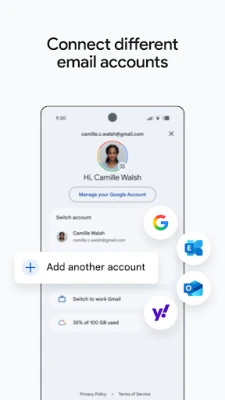
- Multiple account support – Switch between personal Gmail, work accounts, or other email providers without leaving the app.
- Calendar integration – Tap “Add to Calendar” on event‑related emails to create Google Calendar entries instantly.
- Notifications & widgets – Customizable alerts and Wear OS tiles keep you informed without opening the app.
How the application works
When you open Gmail, the app connects securely to Google’s servers using HTTPS. Your messages are stored in the cloud, so changes made on the phone appear on any other device logged into the same account. The AI features run on‑device where possible, while more complex language models are accessed through Google’s cloud, requiring an internet connection.
To compose a message, tap the “+” button, write your text, and let the AI suggest completions or quick replies. The search bar at the top accepts natural‑language queries such as “photos from last summer” and returns relevant emails and attachments.
Installation information
Gmail is available for free on the Google Play Store. Simply search for “Gmail” or use the direct link from the Play Store page, tap “Install,” and wait for the download to finish. The app requires Android 6.0 (Marshmallow) or newer and about 150 MB of storage for the initial install.
Compatibility
The app works on smartphones, tablets, and Wear OS watches. It supports both portrait and landscape orientations and adapts to different screen sizes using responsive layouts. For best performance, keep the app updated through the Play Store.
Things to know before installing
- Google account is required; you can add additional non‑Google accounts via Settings → Add account.
- AI features such as Gemini may need an active internet connection and may be limited by regional availability.
- Data usage can increase when syncing large attachments; consider enabling Wi‑Fi‑only sync in Settings if you have a limited mobile plan.
- Privacy settings allow you to control what data is used for personalized suggestions.
Frequently asked questions
Is Gmail free?
Yes, the core email client is free for personal use. Some advanced AI capabilities may require a Google AI subscription.
Can I use Gmail with other email providers?
Yes, you can add POP3 or IMAP accounts from services like Outlook or Yahoo, though AI features are limited to Google‑hosted mail.
How does spam protection work?
Google’s machine‑learning filters analyze incoming messages in real time, automatically moving suspicious mail to the Spam folder.
Does Gmail work offline?
Recent emails are cached on the device, allowing you to read and draft replies offline. Messages are sent automatically once you reconnect.
Rate the App
User Reviews















Popular Apps










 Games
Games Entertainment
 Communication
 E-mail
 Security
 Tools
Tools Media
Media Internet
 Finance
 Design
 Education
 Android Firmwares
 Travel & Local
 Android
 Windows
 Linux
Linux