


Latest Version
September 06, 2026
程恒盛
Media
Android
10
Free
com.hansen.live_stream_tv
Report a Problem
More About Global TV: Live Channel Player – Free Stream Manager
What is Global TV: Live Channel Player?
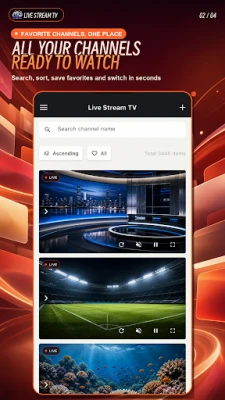
Global TV is a lightweight Android utility that lets you collect, manage, and view live TV streams in one place. It does not provide any content itself; instead, it acts as a player for streams you already have access to, such as personal M3U, M3U8 or JSON playlists, or direct HTTP/HTTPS URLs.
Main features
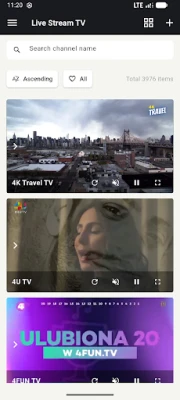
- Channel aggregation – Keep all of your favorite live channels together in a single list.
- Search and filter – Quickly locate a channel by name or by custom tags.
- Favorites – Mark frequently watched streams for instant access.
- Full‑screen playback – Switch to immersive viewing with a simple tap.
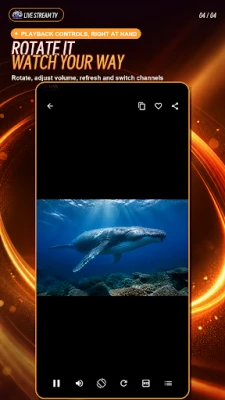
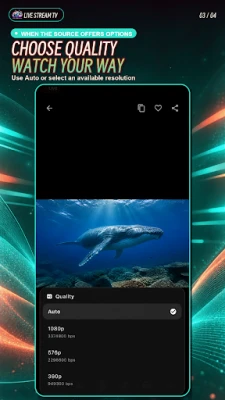
- Playback controls – Mute, rotate the screen, and adjust quality when the source offers multiple options.
- Offline storage – Channel lists and user settings are saved locally on the device.
- Ad‑free option – A one‑time in‑app purchase removes ads permanently; no subscription is required.
How it works
After installing the app, you can import a playlist file (M3U, M3U8, JSON) or paste a direct stream URL. The app parses the list, displays each entry as a selectable channel, and streams the content using Android’s built‑in media player. If a stream provides multiple quality levels, a selector appears so you can choose the most suitable bitrate for your connection.
Practical uses
- Travelers who need quick access to home‑country news channels.
- Sports fans who follow multiple live feeds from different providers.
- Anyone who maintains a personal collection of internet radio or TV streams.
Installation information
The application is distributed as a free download. Installation follows the standard Android process: download the APK, allow installation from unknown sources if required, and launch the app. The initial setup involves adding at least one playlist or stream URL.
Things to know before installing
- The app does not host any video content; you must supply legal stream URLs.
- Playback quality depends on the source and your network connection.
- Ads are shown by default; they can be removed with a one‑time purchase.
Who may find it useful?
Anyone who wants a simple, centralized interface for watching live streams without the clutter of larger media hubs. It is especially handy for users who already curate their own playlists and prefer a dedicated player rather than a full‑featured streaming service.
Frequently asked questions
Do I need an internet connection?
Yes. The app streams content in real time, so a stable data or Wi‑Fi connection is required.
Can I use the app offline?
You can browse saved channel lists offline, but playback requires an active connection to the stream source.
Is there a limit to the number of channels I can add?
No built‑in limit; the only constraint is the device’s storage for playlist files.
How are ads removed?
Through a one‑time in‑app purchase. After purchase, the app disables all ad placements.
Rate the App
User Reviews











Popular Apps










 Games
Games Entertainment
 Communication
 E-mail
 Security
 Tools
Tools Media
Media Internet
 Finance
 Design
 Education
 IT Tools
 Travel & Local
 Android
 Windows
 Linux
Linux