


Latest Version
Latest
August 30, 2026
Fossify
Communication
Android
205
Free
org.fossify.messages
Report a Problem
More About Fossify Messages – Open‑Source SMS & MMS App
What is Fossify Messages?
Fossify Messages is a free, open‑source messaging client for Android devices. It focuses on core SMS and MMS functionality while giving users control over privacy, backups and the look and feel of the app.
Main features
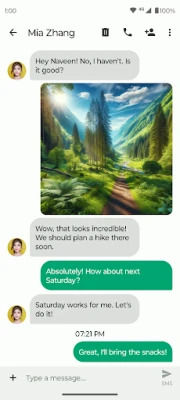
- Standard SMS & MMS support – Send text messages, pictures, videos and group chats without needing a separate messenger.
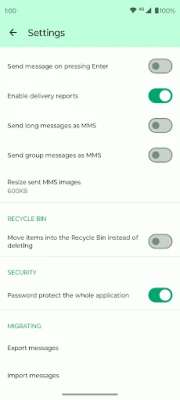
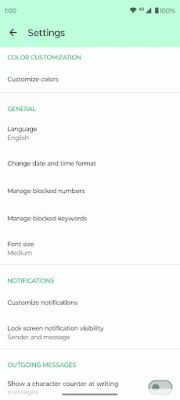
- Spam and unwanted‑message blocking – Add numbers to a block list, import or export that list, and filter messages that contain specific words or phrases.
- Conversation backup – Export your messages to a file and import them later, making it easy to move to a new device or restore after a reset.
- Search within chats – Quickly locate a message by keyword, date or contact without scrolling through entire threads.
- Privacy controls – Choose what appears on the lock screen – sender name only, full text, or nothing at all.
- Material design with dark theme – A modern, lightweight UI that works well in bright or low‑light environments.
How it works
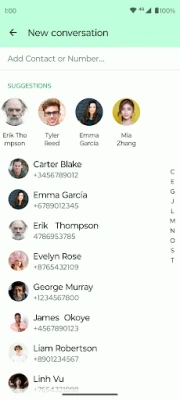
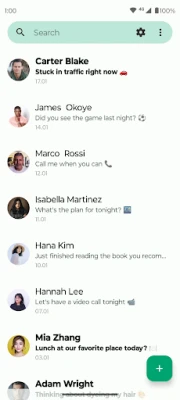
The app integrates with Android’s native messaging system, so it can send and receive SMS/MMS directly through your carrier. When you compose a new message, you can attach photos, videos or emojis just like in the stock app. Incoming messages are displayed in conversation threads, and the built‑in search lets you filter results instantly.
Practical uses
- Keeping personal conversations separate from social‑media messengers.
- Backing up important text records for work or legal purposes.
- Reducing spam by maintaining a custom block list.
- Using a lightweight app on older devices where resource usage matters.
Installation information
Fossify Messages is distributed as an APK that can be installed from trusted sources. Because it is open source, the code is publicly available for review, and updates are provided by the developer, Fossify.
Things to know before installing
- The app requires the standard Android messaging permissions to send and receive SMS/MMS.
- Backup files are stored on your device storage; you should copy them to a safe location if you plan to change phones.
- Blocking rules are applied locally; they do not affect carrier‑level spam filtering.
Who may find it useful?
Anyone who prefers a straightforward SMS experience without the bloat of commercial messengers will appreciate Fossify Messages. It is especially attractive to users who value open‑source software, privacy options and the ability to back up their text history.
Frequently asked questions
Is Fossify Messages free?
Yes, the app is released under a free license and can be used without any purchase.
Can I use it for group messaging?
Yes, the app supports MMS‑based group chats, allowing you to send messages and media to multiple recipients at once.
How do I back up my messages?
From the app’s settings, choose the export option to create a backup file. To restore, use the import function and select the previously saved file.
Does the app work on all Android versions?
The app targets recent Android releases; compatibility with very old versions may be limited.
Rate the App
User Reviews















Popular Apps










 Games
 Entertainment
 Communication
 E-mail
 Security
 Tools
 Media
 Internet
 Finance
 Design
 Education
 Android Firmwares
 Travel & Local
 Android
 Windows
 Linux