

Latest Version
August 16, 2026
Meta Platforms, Inc.
Communication
Android
62
Free
com.facebook.ember
Report a Problem
More About Forum – Dive Deeper into Your Facebook Groups
What is Forum?
Forum is a companion app from Meta Platforms that centers on the groups you already follow on Facebook. While the main Facebook app covers a broad range of social activities, Forum narrows the experience to the conversations that happen inside groups, giving you a dedicated environment for community interaction.
Main features
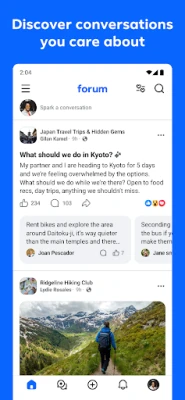
- Group‑focused feed – The home screen shows posts from the groups you belong to, letting you catch up on discussions without the distraction of personal news feeds.
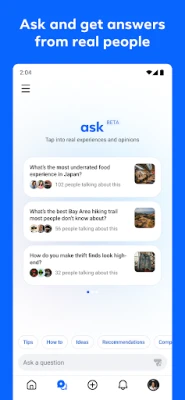
- Ask for advice – A built‑in “Ask” tool aggregates answers from multiple groups, helping you get quick feedback on topics ranging from hobby tips to local recommendations.
- Nickname posting – When you prefer anonymity within a group, you can post using a nickname while still staying logged in with your Facebook account.
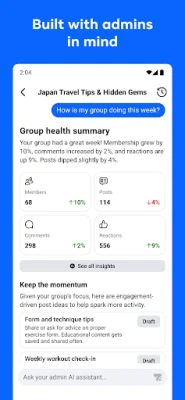
- Admin tools – Group administrators retain access to the moderation and management features they know from Facebook, now available within the Forum interface.
How it works
After installing Forum, you sign in with your existing Facebook credentials. The app automatically pulls in the groups you’re a member of, mirroring the same membership and permissions you have on Facebook. Any post you create in Forum appears in the corresponding Facebook group, ensuring continuity across both platforms.
Practical uses
- Focused browsing – If you spend most of your time reading and contributing to groups, Forum removes the clutter of unrelated content.
- Quick answers – Use the Ask feature to pose a question and receive responses from members of several relevant groups at once.
- Community management – Group admins can moderate posts, approve membership requests, and manage settings without switching back to the main Facebook app.
Installation information
The app is available for free on the Google Play Store. Search for the package name com.facebook.ember or look for “Forum – Facebook Groups” in the store. Tap Install and follow the on‑screen prompts to log in with your Facebook account.
Things to know before installing
- The app requires an active Facebook account; it does not function as a standalone social network.
- All content you share in Forum is still subject to Facebook’s community standards and privacy policies.
- Some features may be limited based on regional availability or the specific settings of the groups you join.
Who may find Forum useful?
Anyone who participates heavily in Facebook Groups—whether for hobbies, local events, professional networking, or support communities—will appreciate a streamlined view of group activity. Administrators looking for a focused tool to manage their communities will also benefit from the dedicated admin interface.
Frequently asked questions
Do I need a separate account for Forum?
No. Forum uses your existing Facebook login, so you do not create a new account.
Will my posts be visible on Facebook?
Yes. Anything you post in Forum is published to the same group on Facebook, preserving the usual visibility and interaction.
Can I use Forum without an internet connection?
The app requires an internet connection to sync groups and display new content. Offline access to previously loaded posts may be limited.
Is my data safe?
Forum follows the same data handling practices as the main Facebook app, governed by Facebook’s privacy policy.
Rate the App
User Reviews















Popular Apps










 Games
Games Entertainment
 Communication
 E-mail
 Security
 Tools
Tools Media
Media Internet
 Finance
 Design
 Education
 Android Firmwares
 Travel & Local
 Android
 Windows
 Linux
Linux