

Latest Version
Latest
August 17, 2026
FlowCrypt a.s.
Communication
Android
128
Free
com.flowcrypt.email
Report a Problem
More About FlowCrypt Encrypted Email – Secure Your Messages
What is FlowCrypt Encrypted Email?
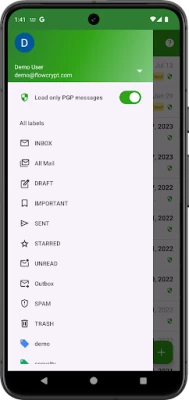
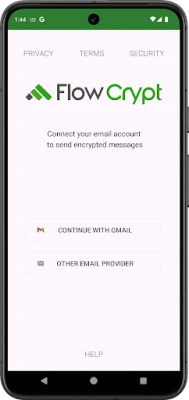
FlowCrypt Encrypted Email is an Android app that brings end‑to‑end PGP encryption to the email accounts you already use. It creates a private‑public key pair on your device and integrates with the native email client, so you can send and receive encrypted messages and files directly from Gmail, Outlook or any other provider that supports standard email protocols.
Main Features
- One‑tap key generation – The app creates a PGP key pair automatically, removing the need for manual key management.
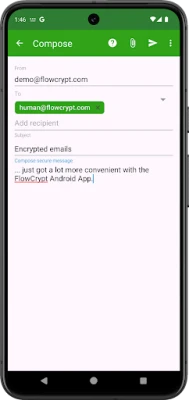
- Seamless encryption – Compose a message, tap the encryption button, and FlowCrypt encrypts the body and any attached files before sending.
- Attachment protection – Files such as PDFs, images, spreadsheets or presentations are encrypted together with the email content.
- Import existing keys – If you already have a PGP key, you can import it and continue using FlowCrypt without starting over.
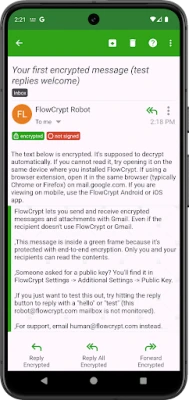
- Automatic decryption – Incoming encrypted messages are detected and decrypted inside the app, showing the original content to you.
How It Works
When you first open FlowCrypt, the app guides you through creating a new key pair or importing an existing one. The public key can be shared with contacts who want to send you encrypted mail, while the private key stays securely on your device. When you compose an email, FlowCrypt encrypts the message with the recipient’s public key (or with a password you choose) and attaches the encrypted payload to the outgoing email. Recipients who have FlowCrypt or another PGP‑compatible client can decrypt the message using their private key.
Practical Uses
- Protecting sensitive work correspondence, such as contracts or financial reports.
- Sending personal information—medical records, passwords, or private photos—without exposing them to intermediaries.
- Ensuring confidentiality when communicating with journalists, activists, or anyone who values privacy.
Installation Information
Download FlowCrypt Encrypted Email from the Google Play Store, then follow the on‑screen setup wizard. The process requires a few taps to generate or import keys and to grant the app permission to access your email accounts. After setup, the encryption button appears in the compose screen of your default email client.
Things to Know Before Installing
- The app stores your private key locally; losing the device or uninstalling the app without backing up the key means you will lose access to encrypted messages.
- Both sender and recipient need a compatible PGP solution to exchange encrypted mail successfully.
- Encryption adds a small amount of processing time, especially for large attachments.
Who May Find It Useful?
Anyone who regularly handles confidential information via email—business professionals, freelancers, students, journalists, or privacy‑conscious individuals—will benefit from FlowCrypt’s straightforward encryption workflow.
Frequently Asked Questions
Do I need a separate email app?
No. FlowCrypt works with the email client already installed on your device, adding encryption capabilities without replacing your existing app.
Can I use FlowCrypt with any email provider?
Yes. As long as the provider supports standard SMTP/IMAP protocols, FlowCrypt can encrypt and decrypt messages.
Is my private key backed up automatically?
The app does not upload keys to the cloud. You must manually back up the key if you want a copy outside the device.
What happens if I lose my device?
Without a backup of your private key, encrypted messages cannot be decrypted. Consider exporting the key to a secure location after creation.
Rate the App
User Reviews















Popular Apps










 Games
Games Entertainment
 Communication
 E-mail
 Security
 Tools
Tools Media
Media Internet
 Finance
 Design
 Education
 Android Firmwares
 Travel & Local
 Android
 Windows
 Linux
Linux