





Latest Version
August 13, 2026
Meta Platforms, Inc.
Communication
Android
424
Free
com.facebook.katana
Report a Problem
More About Facebook – Connect, Share, and Explore Communities
What is Facebook?
Facebook is a social networking app that lets you keep up with friends, family, and the wider world. Developed by Meta Platforms, Inc., it provides a single place to read updates, share photos and videos, join interest‑based groups, and explore a variety of content from around the globe.
Main features
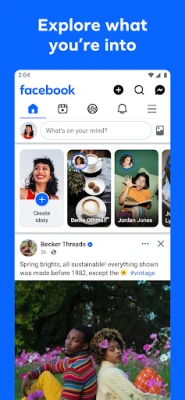
- News Feed – A personalized stream of posts, photos, videos, and articles from people and pages you follow.
- Groups – Join public or private communities centered on hobbies, local events, professional topics, or any shared interest.
- Messenger integration – Send private messages, make voice or video calls, and share media directly from the app.
- Stories and Reels – Create short‑form videos or photo collections that disappear after 24 hours, or browse trending short videos from creators.
- Marketplace – Browse listings for items being sold nearby, and post your own listings to reach local buyers.
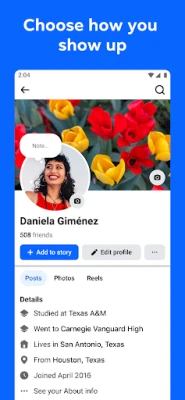
- Profile customization – Add a profile picture, cover photo, and personal details, and control who can see your posts.
How it works
After installing the app, you sign in with your Facebook account or create a new one. The app then builds a feed based on the pages, friends, and groups you interact with. You can like, comment, or share posts, and the algorithm adjusts what appears in your feed over time. Notifications keep you aware of new messages, event invitations, or activity in groups you belong to.
Practical uses
- Stay updated on family milestones and friends’ daily life.
- Find local events, volunteer opportunities, or hobby clubs through groups.
- Buy and sell items in your neighbourhood via Marketplace.
- Share travel photos, celebrate achievements, or simply post a quick status update.
- Use Messenger for quick chats or longer video calls without leaving the app.
Installation information
The Facebook app is available for free on the Google Play Store. Search for "Facebook" or use the package name com.facebook.katana to locate the official listing. Tap “Install” and follow the on‑screen prompts. The app will request basic permissions such as access to storage for media uploads and the camera for taking photos or videos.
Things to know before installing
- Data usage can be significant when streaming videos or loading image‑rich feeds; consider using Wi‑Fi for heavy usage.
- The app may collect usage data to personalize content and ads; review the privacy settings after installation.
- Battery consumption varies with background activity; you can limit background data in Android settings if needed.
Who may find it useful?
Anyone who wants a single hub for social interaction—whether staying in touch with personal contacts, participating in community discussions, or exploring local buying and selling—will benefit from Facebook. The app is especially handy for users who already have a Facebook account and want mobile access to the same features they use on the web.
Frequently asked questions
Do I need a Facebook account to use the app?
Yes. The app requires a Facebook login to access its features. You can create a new account directly within the app.
Can I use Facebook without seeing ads?
The free version includes ads that are part of the platform’s business model. There is no ad‑free option within the standard app.
Is the app available in all languages?
Facebook supports a wide range of languages; the app will display in the language set on your device when that language is supported.
How do I manage privacy settings?
After logging in, go to the Settings menu (usually accessed via the three‑line hamburger icon) and select “Privacy.” From there you can control who sees your posts, who can contact you, and how your data is used.
Rate the App
User Reviews















Popular Apps










 Games
Games Entertainment
 Communication
 E-mail
 Security
 Tools
Tools Media
Media Internet
 Finance
 Design
 Education
 Android Firmwares
 Travel & Local
 Android
 Windows
 Linux
Linux