
Latest Version
September 11, 2026
Blackdot Soultion
Communication
Android
11
Free
com.contact.phone.dialer.phonecall
Report a Problem
More About Contacts & Phone Dialer – Simple Call & Contact Manager
What is Contacts & Phone Dialer?
Contacts & Phone Dialer is a free Android utility that combines basic dialing functions with a straightforward contact manager. Designed for users who prefer a minimalistic experience, the app offers quick access to the phone’s core calling features without the clutter of many pre‑installed dialer apps.
Main Features
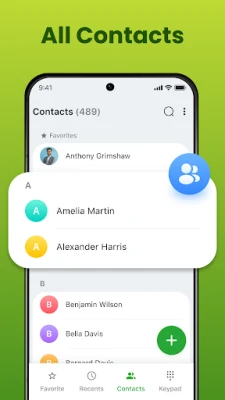
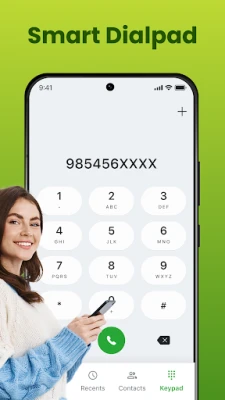
- Smart contact search – Type a name or number and the app instantly filters matching entries.
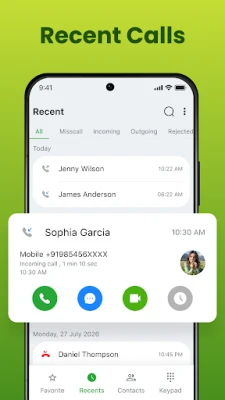
- Call history – View incoming, outgoing and missed calls in a chronological list.
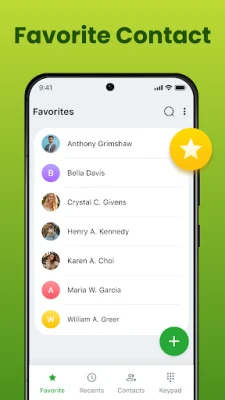
- Favorites and speed dial – Mark frequently called numbers and reach them with a single tap.
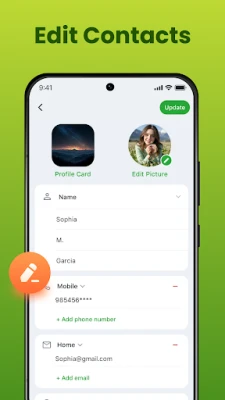
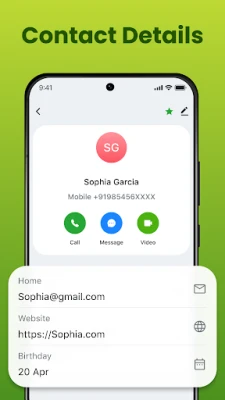
- Contact editing – Add new contacts, edit existing details, and merge duplicates directly within the app.
- Call blocking – Hide unwanted numbers from the call log and prevent them from ringing.
- Customizable look – Choose from a few built‑in wallpapers to give the dialer a personal touch.
How It Works
When you open the app, the main screen presents a numeric keypad alongside a search bar. Typing in the bar filters the contact list in real time, allowing you to tap a result to start a call immediately. The recent‑calls tab shows the latest activity, and each entry can be tapped to redial or long‑pressed to access options such as adding to favorites or blocking the number.
Practical Uses
- Quickly locate a contact when you have only a partial name or number.
- Keep a tidy call log that separates missed calls from answered ones.
- Set up speed‑dial shortcuts for family members, work contacts, or emergency numbers.
- Reduce interruptions by blocking telemarketers or spam callers.
Installation Information
The application is distributed as a free APK. Installation follows the standard Android process: download the file, enable installation from unknown sources if required, and tap the APK to begin the setup. No additional configuration is needed after installation.
Compatibility
Contacts & Phone Dialer runs on Android devices that support the standard telephony framework. Because the app does not rely on advanced APIs, it works on a wide range of Android versions, though exact minimum requirements are not specified by the developer.
Things to Know Before Installing
- The app does not replace the system dialer; it operates as an alternative interface that can be launched from the home screen or app drawer.
- All contact data is stored locally on the device; there is no cloud sync or backup built into the app.
- Permissions required are limited to accessing contacts, phone calls and the ability to block numbers.
Who May Find It Useful?
Anyone who wants a straightforward dialing experience without extra features such as messaging, visual voicemail, or integrated social profiles will appreciate this app. It is especially handy for users with older devices or for those who prefer to keep their contact list separate from the manufacturer’s default dialer.
Frequently Asked Questions
Can I import contacts from my existing phone book?
Yes. The app reads the device’s contact database, so any contacts already saved on the phone are available immediately.
Does the app support multiple SIM cards?
It works with the default telephony service, so calls can be placed using whichever SIM is set as primary in the system settings.
Is there a way to restore blocked numbers?
Blocked numbers are listed in a simple block list within the app; you can remove entries to allow calls again.
Will using this dialer affect my battery life?
The app is lightweight and does not run background services, so its impact on battery consumption is minimal.
Rate the App
User Reviews
Other Apps in This Category













Popular Apps










 Games
Games Entertainment
 Communication
 E-mail
 Security
 Tools
Tools Media
Media Internet
 Finance
 Design
 Education
 IT Tools
 Travel & Local
 Android
 Windows
 Linux
Linux