

Latest Version
Latest
August 22, 2026
Carrara
Communication
Android
115
$3.99
mattecarra.chatcraft.pro
Report a Problem
More About ChatCraft Pro for Minecraft – Mobile Server Connector
What is ChatCraft Pro for Minecraft?
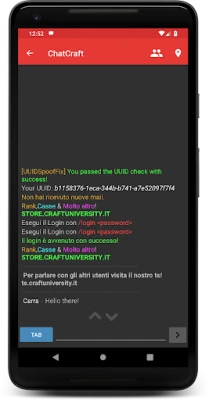
ChatCraft Pro is a mobile client that brings the Minecraft multiplayer experience to Android devices. Developed by Carrara, the app lets you log in to a wide range of Minecraft servers—whether they run vanilla, Forge, Bukkit, Spigot, or Sponge—without needing the full game installed on your phone.
Main features
- Broad server compatibility: Connect to servers from early versions (around 1.7) up to the latest releases.
- Chat customization: Full support for colored text and the ability to filter messages for specific keywords.
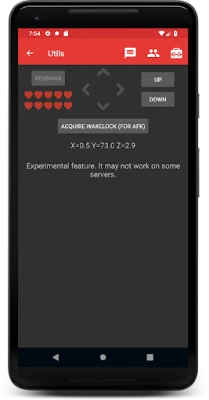
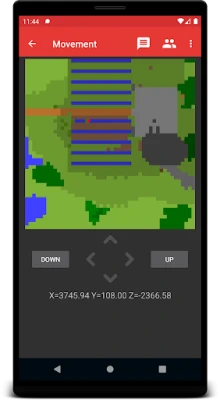
- Mini‑map and movement: A simple mini‑map shows your character’s position, and you can make small movements to keep the session active.
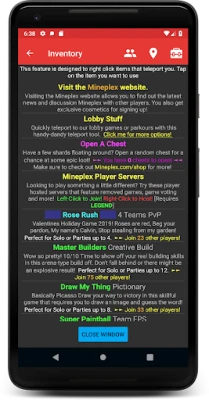
- Inventory interaction: Tap items in your inventory to teleport to their locations on the server.
- AFK assistance: Automatic reconnection, periodic movement, and optional message sending help maintain an active presence.
- Notifications: Get alerts when you are attacked or when particular chat phrases appear.
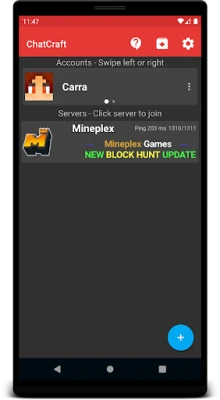
- Multiple accounts: Store several usernames and passwords for quick switching between servers.
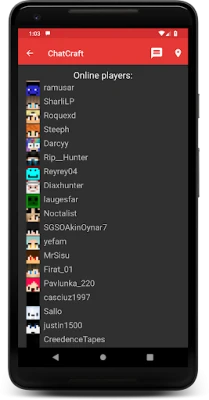
- Player list with skins: View who is online with their Minecraft skins displayed.
How it works
After installing the app, you create a profile with your Minecraft username (and password for non‑premium servers, if needed). You then add a server by entering its address and port. The client establishes a connection using the same protocol as the desktop game, allowing you to chat, move, and interact with the world. Features such as auto‑reconnect and periodic movement run in the background, helping you stay online even when the app is not in the foreground.
Practical uses
- Stay connected while away: Use the AFK tools to keep your character online during long breaks.
- Manage multiple servers: Switch between different communities without logging out each time.
- Quick inventory checks: Jump to specific locations by tapping items, useful for farms or bases.
- Receive important alerts: Notifications let you react promptly to attacks or important chat messages.
Installation information
The app is available for purchase at $3.99. After purchase, download and install it like any other Android application. No additional files are required; the client handles all network communication internally.
Compatibility
ChatCraft Pro supports a wide range of Minecraft server versions, from early 1.7 releases up through the most recent updates. It runs on Android devices that meet the standard requirements for modern apps, though exact OS version details are not published.
Things to know before installing
- The app does not include the full Minecraft game; it only provides a client for server interaction.
- For premium (paid) Minecraft servers, you will need a valid Minecraft account.
- Background operation may be limited by device power‑saving settings; adjusting those settings can improve AFK reliability.
Who may find it useful?
Anyone who wants to stay connected to their Minecraft community while on the go—whether you’re a casual player checking chat, a server admin monitoring activity, or a builder who needs quick inventory access.
Frequently asked questions
Can I use ChatCraft Pro with the official Minecraft Java Edition?
Yes. The client connects to the same server protocols used by the Java Edition, so you can join the same worlds you play on a PC.
Is my login information stored securely?
The app saves credentials locally for convenience. Users should ensure their device is protected with a screen lock and consider using Android’s built‑in encryption.
What happens if the app is closed while I’m AFK?
Background restrictions on some devices may pause AFK actions. Adjusting battery optimization settings for ChatCraft Pro can help maintain activity.
Rate the App
User Reviews















Popular Apps










 Games
 Entertainment
 Communication
 E-mail
 Security
 Tools
 Media
 Internet
 Finance
 Design
 Education
 Android Firmwares
 Travel & Local
 Android
 Windows
 Linux