

Latest Version
Latest
September 05, 2026
Georg Lukas
Communication
Android
29
Free
org.yaxim.bruno
Report a Problem
More About Bruno the Jabber Bear – Light‑hearted XMPP Messenger
What is Bruno the Jabber Bear?
Bruno the Jabber Bear is an Android instant‑messaging client that connects to XMPP servers. Developed by Georg Lukas, it offers a themed experience built on the open‑source Yaxim codebase, adding a bright color palette and a friendly bear mascot to the standard XMPP functionality.
Main features
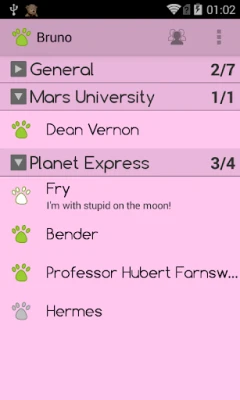
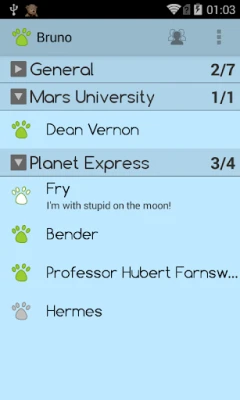
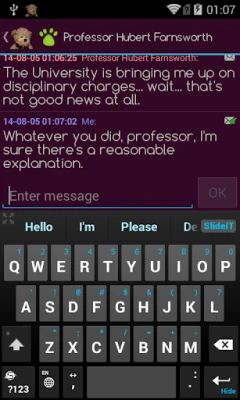
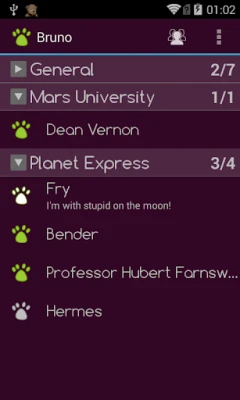
- Vibrant visual theme – The app uses a mix of magenta, pink, ice‑blue and pine‑green tones to give chats a lively look.
- Standard XMPP support – Connect to any XMPP server, including public services such as Google Talk, Facebook Chat (when available) or self‑hosted domains.
- Automatic reconnection – When the device switches between Wi‑Fi and mobile data, Bruno attempts to restore the session without user intervention.
- Roster management – Add, edit, and organize contacts directly within the app.
- Message history – Conversations are stored locally so you can scroll back through past messages.
- Message Carbons (XEP‑0280) – If your server supports it, messages sent from other devices appear in Bruno, keeping your chat history synchronized.
How it works
After installing the app, you enter the address of your XMPP server, your username (often in the form user@domain) and your password. Bruno then establishes a secure TLS connection. If the server presents a self‑signed certificate, the app prompts you to confirm the trust relationship, helping you avoid accidental man‑in‑the‑middle attacks.
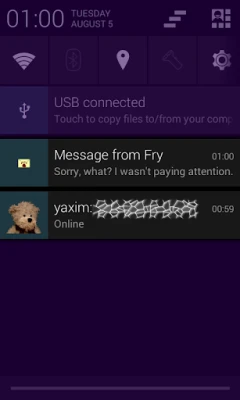
Once connected, the contact list (roster) is downloaded. You can start a chat by tapping a contact, type your message, and send it. The interface shows incoming messages in real time, and the app handles network changes gracefully, attempting to resume the session automatically.
Practical uses
- Stay in touch with friends or colleagues who use XMPP‑based services.
- Maintain a separate, privacy‑focused chat account that does not rely on mainstream social platforms.
- Use the app on devices with limited resources; the underlying Yaxim code is lightweight.
Installation information
The application is distributed as a free APK. To install, enable Unknown sources in your device settings, download the APK, and follow the standard installation prompts. Because the app is not listed on the Google Play Store, you should obtain the file from a reputable source.
Compatibility
Bruno the Jabber Bear is built for Android devices that can run standard APKs. Specific minimum Android version information is not provided, but the original Yaxim client supports Android 2.3 and later, suggesting broad compatibility across older and newer phones.
Things to know before installing
- Since the app is not tied to a particular XMPP service, you need an existing XMPP account or you must create one on a server of your choice.
- The app does not include built‑in voice or video calling; it focuses on text chat.
- Updates are not delivered through the Play Store, so you will need to check the developer’s distribution channel for newer versions.
Who may find it useful?
Anyone who prefers a lightweight, open‑source XMPP client with a distinctive visual style will appreciate Bruno. It is especially suitable for users who enjoy customizing their messaging experience without the clutter of large commercial apps.
Frequently asked questions
Do I need a Google account to use Bruno?
No. Bruno works with any XMPP server, independent of Google services.
Is my chat data stored on a remote server?
Message history is saved locally on the device. The server stores messages only as part of the XMPP protocol, as with any standard client.
Can I use multiple XMPP accounts?
The original Yaxim client supports multiple accounts, and Bruno inherits that capability, allowing you to add more than one account within the app.
Rate the App
User Reviews















Popular Apps










 Games
Games Entertainment
 Communication
 E-mail
 Security
 Tools
Tools Media
Media Internet
 Finance
 Design
 Education
 Android Firmwares
 Travel & Local
 Android
 Windows
 Linux
Linux