

Latest Version
August 25, 2026
Qura prince
Communication
Android
106
Free
com.aiemailonline.alleaiemailaccess.allaiemailinbox
Report a Problem
More About All Email Login – Unified Inbox for Multiple Accounts
What is All Email Login?
All Email Login is a free Android application developed by Qura prince that brings together the inboxes of different email providers into a single, streamlined interface. Whether you use Gmail, Yahoo, Outlook or any other IMAP/POP3 service, the app lets you check, read and reply to messages without constantly switching between separate apps.
Main Features
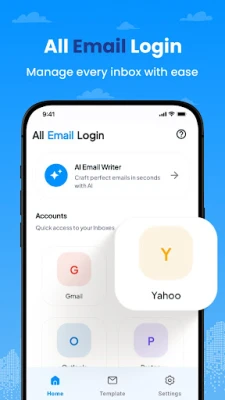
- Multiple account support – Add as many email accounts as you need and switch between them with a tap.
- Unified inbox view – See recent messages from all accounts in one list, or filter by individual account.
- Simple login process – Enter your credentials once per account; the app stores them securely for quick access.
- Lightweight design – The interface is clean and responsive, suitable for both low‑end and high‑end devices.
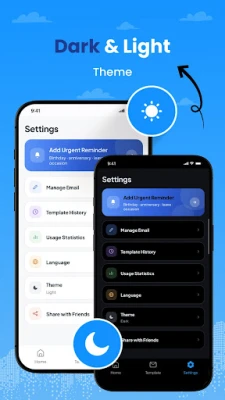
- Theme options – Choose between light and dark themes to match your preference or ambient lighting.
How It Works
After installing the app, you start by adding an email account. The app asks for the email address and password, then automatically detects the appropriate server settings for common providers. Once the account is verified, it begins syncing messages in the background. The main screen shows a chronological list of emails, with clear labels indicating the originating account. Tapping a message opens it in a full‑screen view where you can read, reply, forward, or delete.
Practical Uses
- Personal organization – Keep personal, work, and hobby‑related email accounts together without losing track of any conversation.
- Travel convenience – When on the move, you can quickly glance at all pending messages without juggling multiple apps.
- Small‑business management – Manage a business address alongside a personal one, making it easier to separate professional communication.
Installation Information
The app is available for free on the Appitika store. Simply tap the install button, grant the requested permissions for internet access and storage (if you choose to download attachments), and launch the app once the installation completes.
Compatibility
All Email Login is built for Android devices. Specific version requirements are not listed, but the lightweight design aims to run on a broad range of Android releases. Users with very old devices should verify that the Play Services framework is present for optimal performance.
Things to Know Before Installing
- The app stores login credentials locally; it does not share them with third parties.
- It supports standard email protocols (IMAP, POP3, SMTP). If your provider uses a proprietary API, you may need to configure server details manually.
- Push notifications are provided for accounts that support them; otherwise, the app checks for new mail at regular intervals.
Who May Find It Useful?
Anyone who maintains more than one email address—students, professionals, freelancers, or anyone who prefers a single point of access—will benefit from All Email Login’s consolidated view and straightforward navigation.
Frequently Asked Questions
Can I add an account after the initial setup?
Yes. Open the settings menu, select “Add Account,” and follow the same login steps used for the first account.
Is my password encrypted?
The app stores credentials using Android’s secure storage mechanisms, which encrypt data at rest.
Does the app support attachments?
Attachments can be downloaded and opened with compatible apps installed on your device.
Will the app consume a lot of data?
Sync frequency and data usage depend on the number of accounts and the size of incoming messages. You can adjust sync settings to limit background data.
Rate the App
User Reviews















Popular Apps










 Games
 Entertainment
 Communication
 E-mail
 Security
 Tools
 Media
 Internet
 Finance
 Design
 Education
 Android Firmwares
 Travel & Local
 Android
 Windows
 Linux