
Latest Version
September 09, 2026
simple calculator
Communication
Android
31
Free
com.all.email.login.access
Report a Problem
More About All Email Access: Mail Inbox – Unified Email Management
What is All Email Access: Mail Inbox?
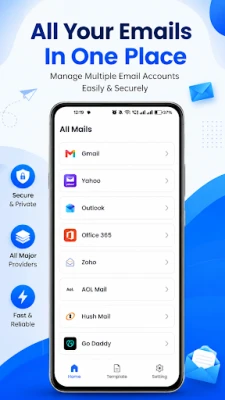
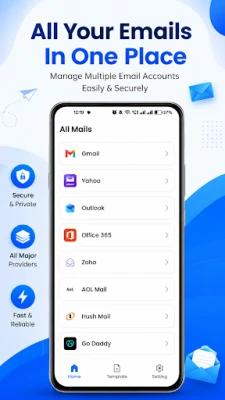
All Email Access: Mail Inbox is a free Android application that brings together the inboxes of several email services into one place. Rather than juggling separate apps for Gmail, Outlook, Yahoo or other providers, you can add each account to this single client and manage messages, attachments and notifications from a unified view.
Main Features
- Unified Inbox – Messages from all linked accounts appear together, while still allowing you to filter by account when needed.
- Multiple Account Support – Add personal, work or any other email address without leaving the app.
- Basic Email Actions – Read, reply, forward, delete and organize messages directly from the inbox.
- Attachment Handling – Open and download attachments without switching to another program.
- Push Notifications – Get timely alerts when new mail arrives for any of your accounts.
- Dark Mode – Switch to a dark theme for comfortable use in low‑light environments.
How It Works
After installing the app, you start by adding an email account. The application uses the standard authentication methods provided by each email service (OAuth, IMAP/SMTP, etc.), so you log in just as you would on the provider’s web portal. Once an account is linked, the app synchronizes the mailbox and displays incoming messages in the unified inbox. You can tap a message to view its content, reply, or forward it. Attachments can be opened with compatible Android apps, and you can move messages into folders that the service supports.
Practical Uses
- Consolidating Work and Personal Mail – Keep business and private correspondence separate yet accessible without switching apps.
- Travel or On‑the‑Go Management – A single notification center helps you stay on top of urgent messages while traveling.
- Lightweight Alternative – For users who prefer a straightforward client without the extra features of larger email apps.
Installation Information
The app is available for free on the Android marketplace. Download and install it like any other application. No additional files or side‑loading steps are required.
Compatibility
All Email Access: Mail Inbox runs on Android devices that meet the minimum system requirements defined by the Google Play Store. Specific version numbers are not listed, but the app is designed for modern Android releases.
Things to Know Before Installing
- Because the app relies on the authentication mechanisms of each email provider, you may be asked to grant permission to access your mailbox during setup.
- The app does not replace the native security features of the email services; it simply acts as a client.
- Storage usage is minimal, limited mainly to cached messages and attachments you choose to download.
Who May Find It Useful?
Anyone who manages more than one email address and prefers a single point of access will benefit from this app. It is especially handy for professionals handling separate work and personal accounts, students with school and personal mail, and users who want a lightweight client without extensive customization options.
Frequently Asked Questions
Can I add any email provider?
The app supports the major providers such as Gmail, Outlook, Yahoo Mail, Office 365, Zoho Mail, AOL, Fastmail and others that use standard IMAP/SMTP protocols. If a service uses a non‑standard login flow, it may not be compatible.
Is my data safe?
All credentials are transmitted using the encryption methods required by each email service. The app does not store passwords locally; it relies on the authentication tokens supplied by the providers.
Does the app work offline?
Messages that have been synchronized can be read without an internet connection, but sending or receiving new mail requires connectivity.
Can I customize notification settings?
Yes, you can enable or disable push notifications for each linked account within the app’s settings.
Rate the App
User Reviews















Popular Apps










 Games
Games Entertainment
 Communication
 E-mail
 Security
 Tools
Tools Media
Media Internet
 Finance
 Design
 Education
 Android Firmwares
 Travel & Local
 Android
 Windows
 Linux
Linux