






Latest Version
Latest
August 31, 2026
Dream Cool Game
Games
Android
6
Free
com.dreamcoolgame.google.animalrun
Report a Problem
More About Super Run Jump: 3D Adventure – Fast‑paced Auto‑Runner
What is Super Run Jump: 3D Adventure?
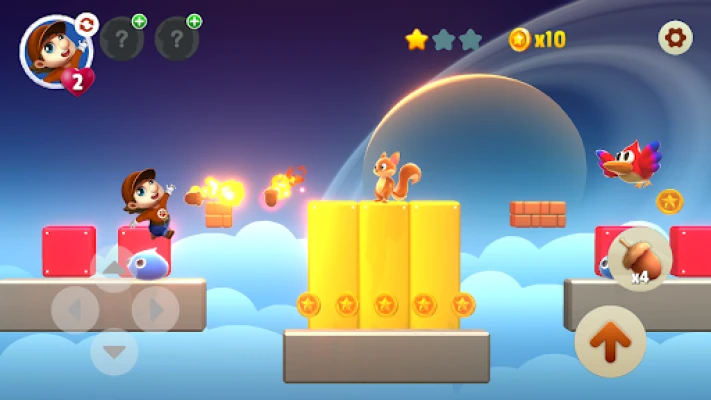
Super Run Jump: 3D Adventure is a free Android game that blends classic platformer instincts with modern 3‑D visuals. The hero moves forward automatically, and players control the journey by tapping to jump, holding for higher leaps, and timing wall‑kicks to navigate obstacles.
Main features
- One‑handed auto‑run gameplay – The character dashes forward without needing a joystick; a simple tap makes the character jump.
- Three‑dimensional worlds – Levels are set in varied environments such as jungle canopies, desert ruins and icy glaciers, each crafted with bright colors and depth.
- Wall jumps and mid‑air spins – Precise taps let you cling to walls, bounce back, and perform spins that add style and extra points.
- Dynamic power‑ups – Mystery blocks hide items like size‑boosting mushrooms, temporary shields and fire‑ball projectiles.
- Boss encounters – At the end of each world, a larger enemy challenges you to combine jumping, dodging and timing.
- Collectibles – Hidden Star Coins are placed throughout each stage for completion‑oriented players.
- Offline play – The entire experience runs without an internet connection.
How it works
When you launch the game, the hero begins running automatically. A quick tap makes the character jump; a longer press results in a higher arc, useful for clearing wide gaps or reaching elevated platforms. When you approach a vertical surface, a well‑timed tap lets the hero cling and push off, performing a wall jump. Combining successive wall jumps and enemy stomps builds a combo multiplier that can trigger a temporary “Coin Rush” mode, increasing the score rate.
Practical uses
The game’s simple control scheme makes it suitable for short sessions during a commute or longer play when you have a few minutes to spare. Because it runs offline, it’s a good choice for travel, flights or places with limited connectivity. The progressive difficulty also offers a steady challenge for players who enjoy improving reflexes and mastering timing.
Installation information
Search for Super Run Jump: 3D Adventure in the Google Play Store, then tap “Install.” The app is free to download and does not require additional purchases to access the core gameplay. After installation, launch the app and follow the brief tutorial that introduces the tap‑to‑jump mechanic and basic wall‑jump timing.
Things to know before installing
- The game is designed for Android devices with touch screens; a stylus can be used but is not required.
- Because the title is an auto‑runner, it is best experienced in portrait orientation, though the game may support landscape on some devices.
- Battery consumption is moderate; playing for extended periods may affect device temperature, as with most graphics‑intensive games.
Who may find it useful?
Fans of retro platformers who appreciate a modern 3‑D twist will feel at home. Players looking for a quick, skill‑based game that can be played with one hand will also enjoy the design. The collectible‑focused elements appeal to completionists, while the boss battles provide a satisfying climax to each world.
Frequently asked questions
- Do I need an internet connection? No. All levels and features are available offline after installation.
- Can I play with a controller? The game is optimized for touch input; controller support is not provided.
- Are there in‑app purchases? The core game is free and does not require purchases to progress. Any optional items are limited to cosmetic enhancements.
- What Android versions are supported? The app runs on standard Android releases that support the Google Play Store; specific version numbers are not listed.
Rate the App
User Reviews















Popular Apps










 Games
Games Entertainment
 Communication
 E-mail
 Security
 Tools
Tools Media
Media Internet
 Finance
 Design
 Education
 IT Tools
 Travel & Local
 Android
 Windows
 Linux
Linux