

Latest Version
Latest
August 13, 2026
SEGA
Games
Android
461
Free
com.sega.sonicdash
Report a Problem
More About Sonic Dash Run – Fast‑paced Endless Runner from SEGA
What is Sonic Dash Run?
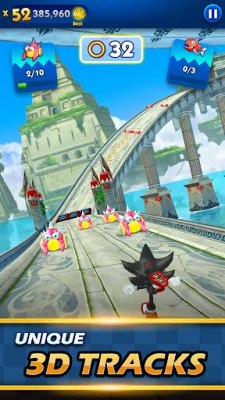
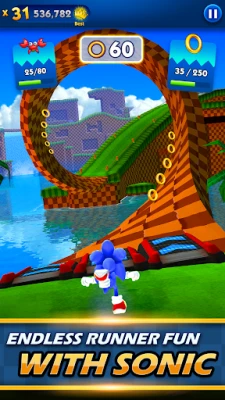
Sonic Dash Run is an endless‑runner game developed by SEGA for Android devices. Players control Sonic the Hedgehog or other characters from the Sonic universe, racing through automatically scrolling 3D environments while tapping to jump, slide, or perform special moves.
Main features
- Instant‑play controls – Simple tap‑based input lets you start running immediately, making the game accessible for short breaks.
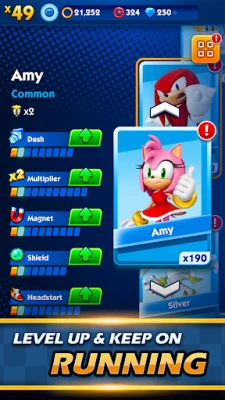
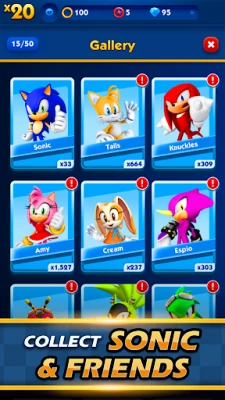
- Multiple characters – Unlock and switch between Sonic, Tails, Knuckles, Shadow and other familiar faces, each with a distinct visual style.
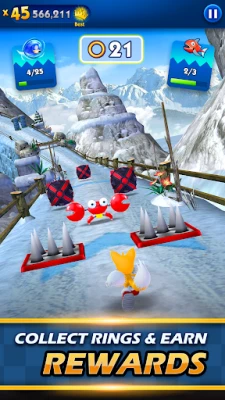
- Varied environments – Levels are inspired by classic Sonic zones, offering loops, corkscrews, beach stretches and sky‑high sections.
- Ring collection – Gather rings as you run; they serve as the primary in‑game currency for upgrades and character cards.
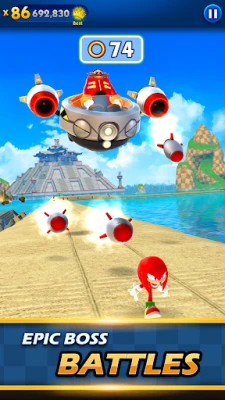
- Boss encounters – Periodic boss battles break the rhythm, requiring timing and quick reflexes.
How it works
The game automatically moves the character forward along a pre‑designed path. You tap the screen to jump over low obstacles, swipe down to slide under higher ones, and can activate a spin‑dash by double‑tapping. Rings appear along the route; collecting them fills a meter that can trigger a temporary speed boost. Progress is measured by distance covered, and the game gradually introduces new obstacles and faster pacing to keep the challenge fresh.
Practical uses
Because the controls are minimal, Sonic Dash Run fits well into brief moments of free time—commuting, waiting in line, or a quick break at work. The game also offers a low‑pressure way to enjoy the Sonic brand without needing a console or extensive setup.
Installation information
The app is distributed as a free download from the Google Play Store. Installation follows the standard Android process: locate the app, tap “Install,” and grant any required permissions that appear during setup. After installation, the game can be launched from the home screen or app drawer.
Things to know before installing
- The app may request access to storage for saving game progress and downloading additional assets.
- Internet connectivity is required for initial download and for accessing leaderboards or in‑app purchases.
- Battery consumption can increase during extended play sessions due to the 3D graphics.
Who may find it useful?
Fans of the Sonic franchise who want a portable, quick‑play experience will feel at home. Players who enjoy endless‑runner mechanics—such as those found in Subway Surfers or Temple Run—will appreciate the familiar yet distinct Sonic twist. The game’s easy entry point also makes it suitable for younger audiences learning basic touch controls.
Frequently asked questions
- Do I need an internet connection to play? A connection is required for the initial download and for any online features, but the core running gameplay can continue offline once the app is installed.
- Can I play without making purchases? Yes. All core gameplay elements are accessible without spending money; in‑app purchases are optional for cosmetic items and extra character cards.
- Is the game compatible with older Android versions? Compatibility depends on the device’s OS version and hardware. The Play Store will indicate whether your device meets the minimum requirements.
Rate the App
User Reviews
Other Apps in This Category









Popular Apps










 Games
Games Entertainment
 Communication
 E-mail
 Security
 Tools
Tools Media
Media Internet
 Finance
 Design
 Education
 Android Firmwares
 Travel & Local
 Android
 Windows
 Linux
Linux