



Latest Version
Latest
September 07, 2026
The New York Times Company
Games
Android
2
Free
com.nytimes.wordgame
Report a Problem
More About NYT Crossplay: Play and Spell – Turn‑Based Word Duel
What is NYT Crossplay?
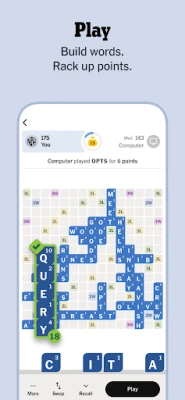
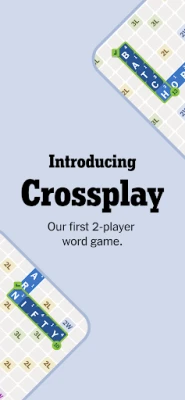
NYT Crossplay: Play and Spell is a multiplayer word‑building game created by The New York Times Company. It focuses on a simple, turn‑based format where two players place letter tiles on a shared board to form words and score points. The experience is designed to be distraction‑free, with no in‑app advertisements, and includes tools that help players improve their vocabulary.
Main Features
- Two‑player turn‑based play – Each participant takes turns placing tiles, allowing for a relaxed pace.
- In‑game chat – Players can exchange short messages while they play, making the game social.
- Leaderboard – Wins and scores are tracked, letting you see how you rank against friends or random opponents.
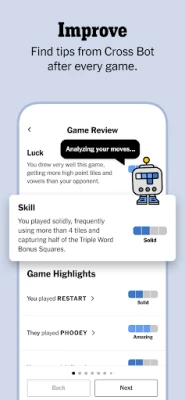
- Cross Bot tips – After each match, the game offers brief suggestions to help you refine your strategy.
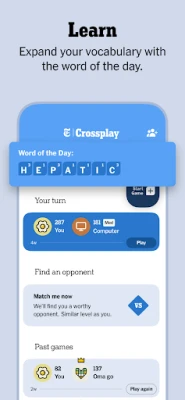
- Word of the Day – A daily highlighted word expands your vocabulary.
- Built‑in dictionary – Tap any word on the board to view its definition without leaving the app.
- Game history – Review past matches, see the words you created, and track statistics such as longest word or average score.
How It Works
When you start a session, the app generates a blank grid and a set of letter tiles for each player. Players alternate turns, placing tiles to form valid words that intersect with existing ones, similar to classic crossword mechanics. Each placed word earns points based on tile values and board bonuses. The game ends when both players pass or the board fills up, and the higher score wins.
Practical Uses
- Casual competition – Challenge a friend or family member for a quick mental workout.
- Vocabulary building – Use the dictionary and word‑of‑the‑day features to learn new terms.
- Strategic practice – The turn‑based nature lets you think ahead and experiment with different word placements.
Installation Information
The app is offered as a free download from the Google Play Store. Installation follows the standard Android process: tap “Install,” wait for the download, and open the app once it finishes. No additional purchases or subscriptions are required to enjoy the core gameplay.
Things to Know Before Installing
- The game requires an internet connection for multiplayer matching and leaderboard updates.
- There are no in‑app advertisements, so you won’t encounter pop‑ups or banner ads during play.
- All gameplay is contained within the app; external links or downloads are not part of the experience.
Who May Find It Useful?
Anyone who enjoys word puzzles, casual competitive play, or wants a low‑pressure way to practice spelling will appreciate NYT Crossplay. It’s especially suitable for:
- Students looking to reinforce vocabulary.
- Friends and families seeking a quick, shared activity.
- Fans of The New York Times’ puzzle portfolio who want a mobile, multiplayer twist.
Frequently Asked Questions
Do I need a New York Times account?
No. The game can be launched with a simple sign‑up or guest mode, though creating an account may allow you to sync progress across devices.
Can I play against random opponents?
Yes. The matchmaking system pairs you with other players when you choose the “Play with random opponent” option.
Is there a way to pause a game?
Since the game is turn‑based, you can simply leave the match and return later; your opponent’s turn will be waiting.
Are there any hidden costs?
The core game is free and contains no ads. All features described are available without additional payment.
Rate the App
User Reviews















Popular Apps










 Games
Games Entertainment
 Communication
 E-mail
 Security
 Tools
Tools Media
Media Internet
 Finance
 Design
 Education
 IT Tools
 Travel & Local
 Android
 Windows
 Linux
Linux