

Latest Version
Latest
August 28, 2026
LEE JAEMIN
Games
Android
102
Free
com.leya.momo
Report a Problem
More About MoMo – Learn Morse Code Through Play
What is MoMo?
MoMo is a free Android app created by developer LEE JAEMIN that helps users learn Morse code in a hands‑on, game‑like environment. Rather than relying on rote memorization, the app blends visual flashcards, audio cues, and typing practice so the patterns become intuitive.
Main Features
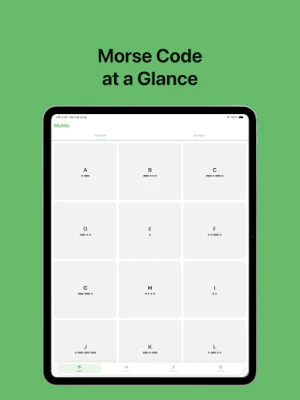
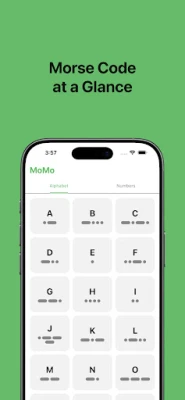
- Flashcard library – Browse the full alphabet and numbers, each displayed with its dot‑and‑dash representation.
- Audio playback – Tap any symbol to hear the exact Morse sound, reinforcing the link between sight and hearing.
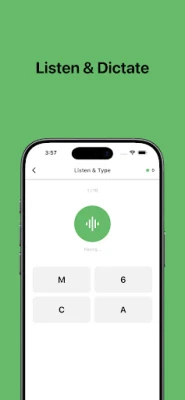
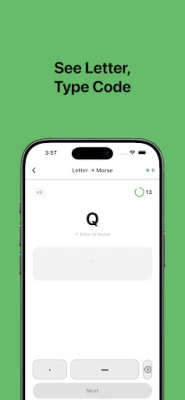
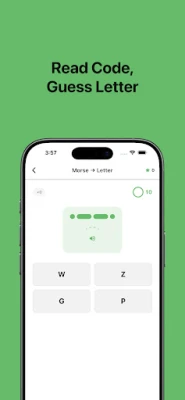
- Multiple game modes – Choose from recognition (Morse → letter), production (letter → Morse input), and transcription (listen → type) challenges.
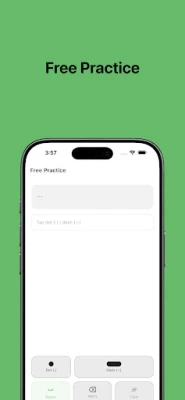
- Free practice – Enter any sequence of dots and dashes and see the decoded text instantly, with optional playback of your input.
- Adjustable speed – Set the playback speed to match your learning stage, from slow introductions to rapid drills.
- Dark / Light theme – The interface adapts to your system setting for comfortable use in any lighting.
- Score tracking – The app records accuracy and streaks, giving you a sense of progress without intrusive leaderboards.
How It Works
When you open MoMo, you can start in a study mode that presents each character as a card. Tapping the card plays the Morse tone, letting you associate the sound with the visual pattern. Switching to a game mode presents a prompt—either a series of dots and dashes or a spoken tone—and asks you to select or type the matching letter. The app validates your input in real time, offering hints when needed.
Practical Uses
- Hobbyists who enjoy amateur radio can practice decoding real‑world signals.
- Students studying communication history gain a tactile feel for the code.
- Educators can use the free practice screen as a classroom activity.
- Anyone curious about Morse can explore at a comfortable pace without pressure.
Installation Information
MoMo is available as a free download from the Google Play Store. The package name is com.leya.momo. Installation follows the standard Android process: tap Install, grant any required permissions, and launch the app from your app drawer.
Things to Know Before Installing
- The app does not require special hardware; a standard touchscreen and speaker are sufficient.
- Because the app is free, it may include non‑intrusive ads, but they do not interfere with core learning functions.
- No external accounts are needed; progress is stored locally on the device.
Who May Find MoMo Useful?
Anyone with an interest in learning Morse code—whether for personal curiosity, hobby radio, or historical study—will benefit from MoMo’s blended approach. The app’s adjustable difficulty makes it suitable for absolute beginners as well as users who already know the basics and want to improve speed and accuracy.
Frequently Asked Questions
- Do I need an internet connection? All core features work offline after the initial download.
- Can I change the visual theme? Yes, the app follows your device’s dark or light mode setting automatically.
- Is my progress saved? Scores and accuracy stats are saved locally; uninstalling the app will remove that data.
- What languages are supported? The interface is in English; the Morse symbols themselves are universal.
Rate the App
User Reviews
Other Apps in This Category















Popular Apps










 Games
 Entertainment
 Communication
 E-mail
 Security
 Tools
 Media
 Internet
 Finance
 Design
 Education
 Android Firmwares
 Travel & Local
 Android
 Windows
 Linux