






Latest Version
Latest
August 29, 2026
Linychenko Oleksandr
Games
Android
113
Free
com.allanapp88.lines
Report a Problem
More About Lines – Classic Puzzle Game for Android
What is Lines?
Lines is a casual puzzle game that challenges you to create straight lines of matching colored balls on a grid. By forming lines of at least five balls horizontally, vertically, or diagonally, you clear them from the board and score points. The game’s simple mechanics make it easy to pick up, while the strategic element of planning moves adds depth for longer sessions.
Main Features
- Classic gameplay based on the well‑known Lines 98 concept.
- Three difficulty levels let you adjust the challenge to your skill.
- Multiple save slots enable you to keep separate progress for each difficulty.
- High‑score tracking records your best results per level.
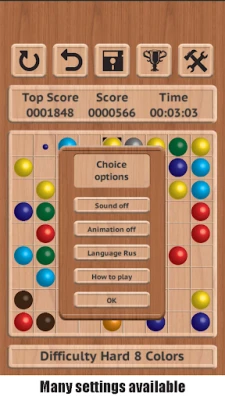
- Optional animations can be turned on or off to suit performance preferences.
- Autosave ensures your game state is preserved without manual intervention.
How It Works
At the start of each turn, a set of colored balls appears on the board. Small indicator balls show where new pieces will be added on the next turn. You can move any ball to an empty cell, provided there is an unobstructed path. When you line up five or more balls of the same color, they disappear and you receive points—the longer the line, the higher the reward. The game continues until the board fills up, prompting you to start a new session.
Practical Uses
Lines serves as a quick mental break, perfect for short pauses during the day or longer relaxed play in the evening. Its incremental difficulty makes it suitable for both casual players looking for a brief distraction and puzzle enthusiasts who enjoy improving their scores over time.
Installation Information
The app is offered as a free download. Installation follows the standard Android process: tap the install button, grant any required permissions, and launch the game from your app drawer. No additional setup steps are needed.
Compatibility
Lines runs on Android devices that meet the basic system requirements for modern apps. Specific version numbers are not listed, but the app is designed to function on a wide range of smartphones and tablets.
Things to Know Before Installing
- The game does not require an internet connection for core gameplay.
- All data, including saved games and high scores, is stored locally on the device.
- Animation settings can be adjusted in the options menu to improve performance on lower‑end hardware.
Who May Find It Useful?
Anyone who enjoys simple yet strategic puzzle games will appreciate Lines. It is especially appealing to players who like to track progress through scores and like the flexibility of choosing a difficulty level that matches their skill.
Frequently Asked Questions
- Do I need an internet connection? No, the game can be played offline.
- Can I save multiple games? Yes, the app provides three separate save slots.
- Are there in‑app purchases? The app is free and does not list any paid features.
- How do I clear the board faster? Focus on creating longer lines and plan moves to avoid filling the board with scattered balls.
Rate the App
User Reviews
Other Apps in This Category















Popular Apps










 Games
 Entertainment
 Communication
 E-mail
 Security
 Tools
 Media
 Internet
 Finance
 Design
 Education
 Android Firmwares
 Travel & Local
 Android
 Windows
 Linux