

Latest Version
Latest
September 16, 2026
IntercontinentalExchange, Inc
HOUSE AND HOME
Android
19
Free
com.ice.collaborationcenter
Report a Problem
More About Collaboration Center – Real‑Estate Coordination App
What is Collaboration Center?
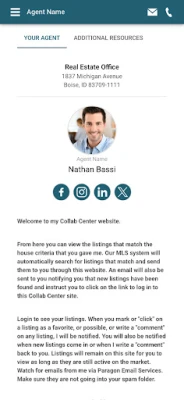
Collaboration Center is a free Android application created by IntercontinentalExchange, Inc. It is designed as a shared workspace for people involved in real‑estate transactions. Whether you are looking for a new home, managing a listing, or assisting clients as an agent, the app provides a central place to view property details, record preferences and keep track of interactions.
Main features
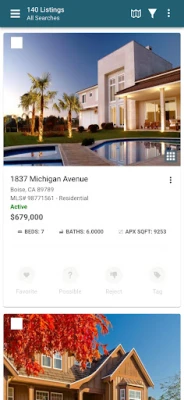
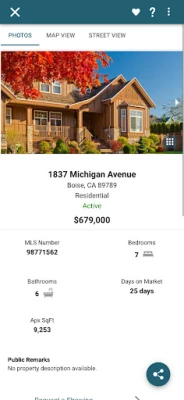
- Property overview – Browse listings that match your criteria, see key data such as price, size and location, and add personal notes.
- Preference tags – Mark each property as a favorite, possible, or rejected, making it easy to filter and revisit the most relevant homes.
- Side‑by‑side comparison – Select multiple listings and compare their attributes in a single view.
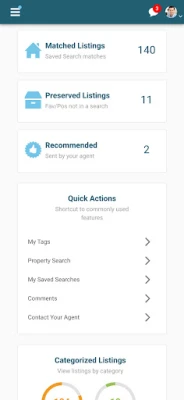
- Activity monitoring for sellers – View how many agents and prospective buyers have viewed a listing, see saved‑search counts and observe any social activity linked to the property.
- Commenting and collaboration – Add comments that are visible to other participants, enabling transparent communication among buyers, sellers and agents.
How it works
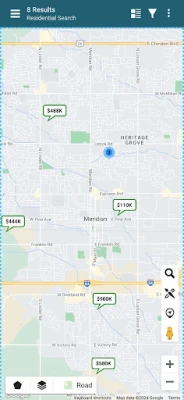
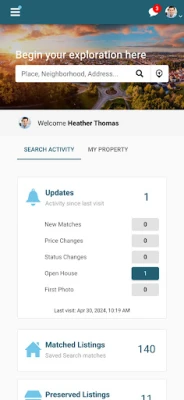
After installing the app, users create a simple account linked to their email address. The interface presents a dashboard where you can switch between “Buyers”, “Sellers” and “Agents” modes. In buyer mode, you can run a property search using filters such as location, price range and property type. Results appear as cards that can be tapped to open a detailed view, where you can apply preference tags and write notes.
In seller mode, the app pulls data about your active listings (provided you have linked your brokerage account or entered the listing IDs manually). You can then see aggregated metrics – for example, the number of views per listing, how often it has been saved in other users’ searches, and any recommendations made by agents.
All changes are synced to the cloud, so collaborators see updates in real time. The app does not store personal documents; it only handles metadata related to listings and user‑generated notes.
Practical uses
- Home buyers can keep a tidy shortlist of properties, compare them side by side and share comments with a spouse or real‑estate agent.
- Sellers gain insight into the interest their property is generating without needing separate reporting tools.
- Agents can coordinate with clients by marking properties, adding recommendations and tracking which listings have been viewed.
Installation information
The app is available through the Google Play Store. Installation follows the standard Android process: tap “Install”, grant the requested permissions (typically storage for saving notes and network access for syncing), and launch the app. First‑time users are guided through a brief onboarding flow that explains the main sections and how to add a property to their watchlist.
Things to know before installing
- The app is free to download and use; no in‑app purchases are required.
- Because the app relies on cloud sync, an active internet connection is needed for the latest activity data.
- All data is stored on secure servers operated by IntercontinentalExchange, Inc. Users should review the privacy policy within the app for details on data handling.
Who may find it useful?
Anyone actively engaged in buying or selling residential real estate can benefit from Collaboration Center. First‑time homebuyers who want a simple way to organize listings, seasoned investors tracking multiple properties, and real‑estate professionals looking for a lightweight collaboration tool will all find value in the app’s focused feature set.
Frequently asked questions
Is the app compatible with all Android devices?
The developer has not published specific version requirements, but the app runs on standard Android smartphones and tablets that support Google Play services.
Can I export my notes or property lists?
Export functionality is not listed among the core features. Users can manually copy notes or take screenshots if they need an offline record.
Do I need a brokerage account to use the seller features?
Linking a brokerage account simplifies data import, but the app also allows manual entry of listing identifiers for sellers who prefer not to connect external accounts.
Is there any cost for premium features?
All described capabilities are offered at no charge. The app does not advertise a premium tier.
Rate the App
User Reviews

Popular Apps










 Games
Games Entertainment
 Communication
 E-mail
 Security
 Tools
Tools Media
Media Internet
 Finance
 Design
 Education
 Android Firmwares
 Travel & Local
 Android
 Windows
 Linux
Linux